
Selecting an LLM for AI features in WEBCON
Applies to version: 2026 R2 and above; author: Lily Adamowicz
Related documentation
A detailed description of the functionalities mentioned herein and their configuration can be found in the following sections of the WEBCON Help:
Getting started
AI-powered features can support users not only with simple tasks, such as summarizing content or translating text, but also with more complex scenarios, including data analysis, document processing, user assistance in WEBCON Portal, and automation of activities performed within business processes. However, not all of these tasks require the same type of LLM.
WEBCON allows you to select the AI model used by specific features. This gives administrators and application designers the option to use either the default model or a specific one, such as Gemini Flash Lite, Gemini Flash, or Gemini Pro, as well as equivalent models from other providers. As a result, the configuration can be better aligned with the nature of the task, the expected response quality, processing speed, and model usage costs.
NOTE: The list of available LLMs applies to AI Proxy Online. When using AI Proxy Self-hosted, the models to be used in the system must be added and configured manually.
Where can the AI model be selected?
The AI model used by system-wide features can be selected in System settings, on the Global parameters tab. This applies to the model used by AI Concierge and to the model used for translating processes and applications.
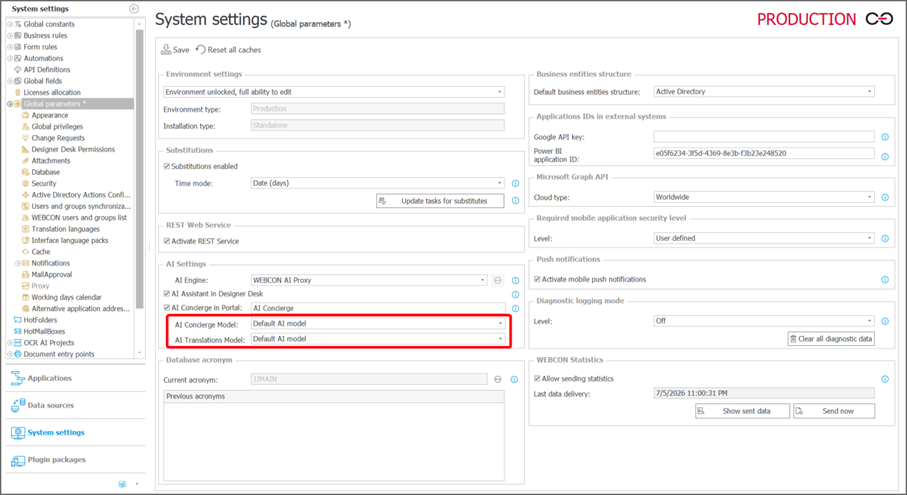
Fig. 1. Selecting a model for AI Concierge and translations
For other features, the model is selected directly in their configuration. One example is AI Agents, where the AI model field is available in the configuration of each individual AI Agent.
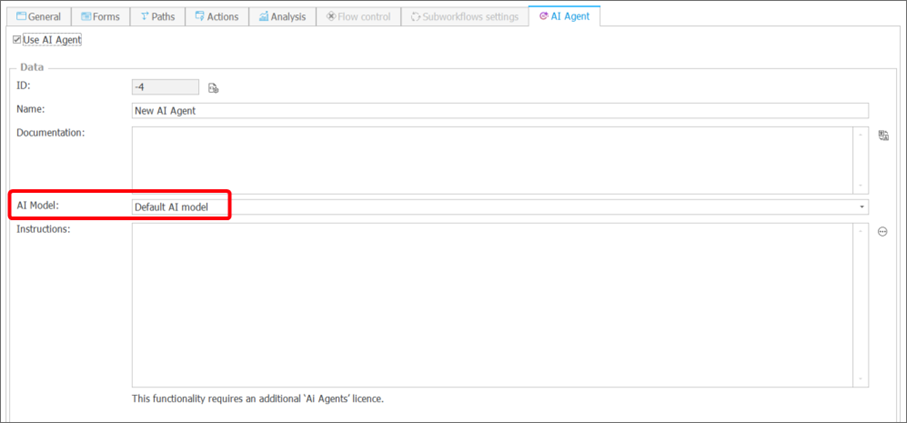
Fig. 2. Selecting an AI model for an AI Agent
Similarly, for the AI Create transcription action, the model used to transcribe an audio recording can be selected directly in the action configuration.
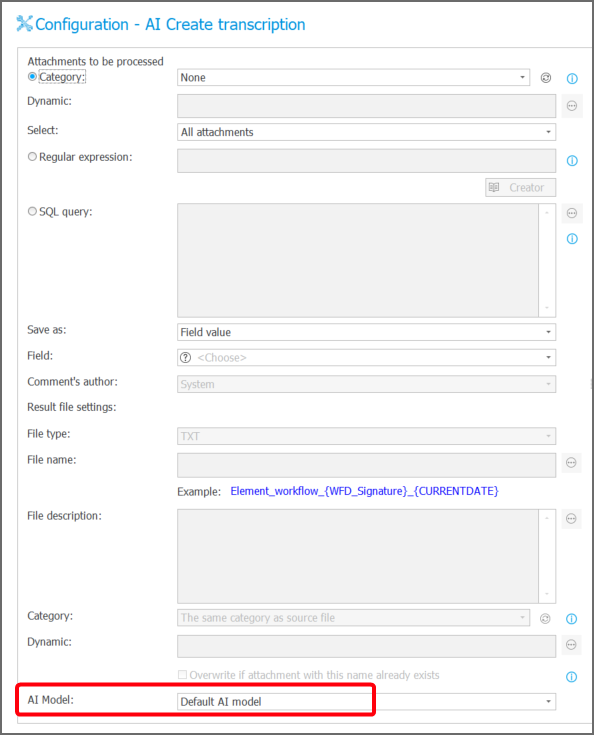
Fig. 3. Selecting an AI model for the AI Create transcription action
The list of models available in a given configuration is retrieved from AI Proxy. This means that users only see the models supported in that specific context.
How to choose an AI model?
The choice of AI model should depend on the nature of the task, the expected number of requests, and the required output quality. For simple, repetitive scenarios, the default model, Gemini Flash Lite, is a suitable choice. For standard business use cases, Gemini Flash offers a good balance between processing speed, response quality, and cost. Gemini Pro is better suited to more complex tasks that require deeper analysis, a longer context window, or greater precision.
The default model, Gemini Flash Lite, works well when initially enabling AI features, testing configurations, and handling straightforward scenarios that do not require additional optimization. A specific model should be selected when a feature is used intensively or has a clearly defined purpose, such as supporting AI Concierge, translating applications, transcribing recordings, or analyzing data with an AI Agent.
INFO: The list of available models is not limited to Gemini models. It also includes equivalent models provided by other vendors.
|
Model |
When to use it |
Example use cases |
|
Default model/ Gemini Flash Lite |
Simple, repetitive tasks, a high volume of short interactions, and scenarios where speed and cost optimization are important |
Initial rollout of AI features, configuration testing, basic user questions, short summaries, draft translations, request classification, and short voice notes |
|
Gemini Flash |
Standard business scenarios where a balance between quality and performance is important |
AI Concierge as a process assistant, typical application translations, case summaries, and standard transcriptions |
|
Gemini Pro |
Complex tasks that require greater precision, contextual analysis, or data from multiple sources |
Longer descriptions and instructions, document analysis, advanced AI Agents, and more difficult or longer recordings |
The simplest approach is to start with the default model or Gemini Flash, and then adjust the configuration based on actual results. If a feature is used very frequently and the responses are short and repetitive, Gemini Flash Lite is worth testing. If response quality is more important than speed or cost, Gemini Pro should be considered.
Example 1: AI Concierge in WEBCON Portal
AI Concierge can help users navigate the Portal, answer questions about applications, and assist them while working with forms.
Example configuration:
- AI Concierge used as a general process assistant that supports users in the application and within the current form context: Gemini Flash (recommended),
- AI Concierge used for simple, repetitive user questions: Gemini Flash Lite.
Example 2: Process and application translations
For translations, the choice of model should depend on the length of the content, its intended use, and the required level of terminological precision.
Example configuration:
- a large volume of simple, repetitive draft translations: Gemini Flash Lite,
- simple form fields, field names, and short messages: Gemini Flash,
- longer descriptions, instructions, and messages requiring high precision, including multilingual applications: Gemini Pro.
Example 3: AI Agents
AI Agents can perform both simple supporting tasks and more complex scenarios involving process data analysis. The LLM should therefore be selected based on the scope of responsibility assigned to a given AI Agent.
Example configuration:
- the AI Agent classifies requests, prepares short summaries, identifies missing information, and produces short, predictable outputs: Gemini Flash Lite,
- the AI Agent analyzes forms, prepares longer summaries and response suggestions: Gemini Flash,
- the AI Agent analyzes documents and data from multiple form fields, compares information from several sources, and performs tasks requiring more advanced reasoning, such as supporting the review of a purchase request, comparing the business justification, budget, previous order history, and attached documents: Gemini Pro.
Example 4: Audio transcription
For the AI Create transcription action, the model should be selected based on the length of the recording, audio quality, and the importance of the transcription for subsequent process handling.
Example configuration:
- short, clear voice notes: Gemini Flash Lite,
- standard recordings used in a business process: Gemini Flash,
- longer or more complex recordings, especially when the transcription is important for the process: Gemini Pro.
Summary
The ability to select an LLM for individual AI features makes it possible to better align system behavior with the organization’s needs. Instead of using a single model for every scenario, you can select a model for a specific task: a faster and more cost-effective model for simple operations, a balanced model for everyday work, and a more advanced model for complex analysis.
As a result, AI features in WEBCON can be configured not only in terms of availability, but also with regard to quality, performance, and predictable behavior in specific business processes.

+48 12 443 13 90