
From Browser to AI: Extending Your Apps with MCP
From Browser to AI: Extending Your Apps with MCP
Over the past weeks, we’ve explored the new web-based Designer Studio—from signing in through building forms and workflows to working across multiple windows, managing changes, and collaborating with others. To close the series, let’s look at what comes next: connecting the applications you build with AI.
Let AI Work with Your Applications
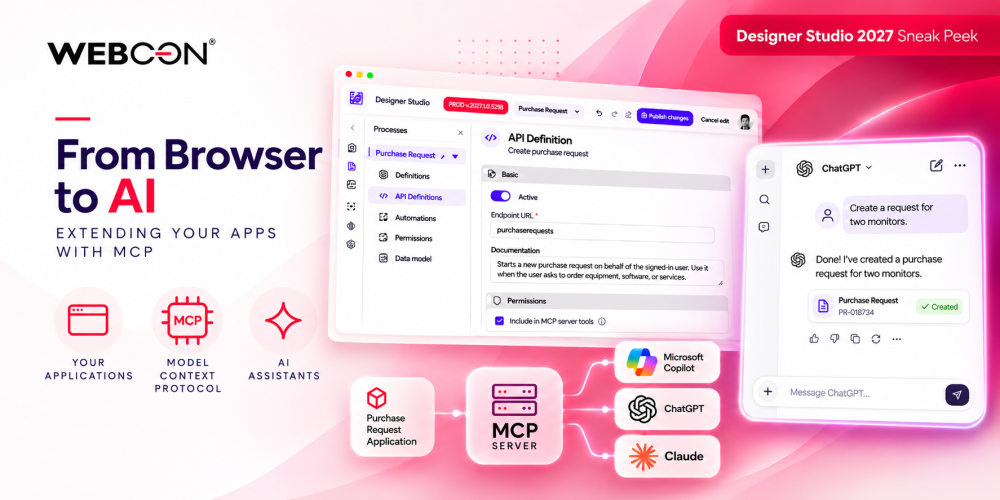
Imagine Anna and her Purchase Request application again. Her colleagues increasingly work in AI assistants such as Microsoft Copilot, ChatGPT, or Claude. Instead of switching between tools, they would like to simply ask:
“What’s the status of my purchase requests?”
or
“Create a request for two monitors.”
This is where the Model Context Protocol (MCP) comes in. WEBCON can expose an application through an application-specific MCP server, allowing compatible AI clients to discover and use selected capabilities of that application.
Turn Existing APIs into AI Tools
MCP does not require you to rebuild your business logic for AI. Instead, the application-specific MCP server uses the API Definitions already configured in your processes. Depending on their configuration, these definitions can become tools for retrieving data, executing automations, creating workflow instances, updating data, or moving instances through workflow paths. The name, description, inputs, and outputs of each MCP tool are based on its API Definition. That makes clear naming and documentation even more valuable, helping both people and AI understand what each tool is designed to do. Designer Studio also provides access to the MCP server specification needed to configure an external AI client.
AI Within Your Existing Security Model
Connecting an AI assistant does not mean bypassing application security. MCP operations are performed in the context of the signed-in user and are restricted by that user’s roles and privileges. Access restriction rules defined for API Definitions also remain in effect. In other words, MCP opens a new way to interact with your applications without opening a new way around their permissions.
A Natural Next Step
WEBCON also provides a general MCP server with built-in tools for scenarios such as accessing tasks, workflow data, attachments, and search. Together with application-specific MCP servers, this creates new possibilities for bringing business processes closer to the AI tools users already work with. And that makes MCP a fitting final chapter for this series.
Designer Studio moves into the browser, making application development more accessible, flexible, and collaborative. MCP takes that idea one step further: the applications you build no longer have to wait for users to come to them.
They can become part of the AI-powered workspace where work is already happening.

+48 12 443 13 90