Home > Forum > Processes > Question: automatic workflow function

Question: automatic workflow function
1

Hello everyone,

I’m working on an appointment function in WEBCON BPS. A user registers an appointment and types in the date and time when, for example, a customer is coming. When I click Register, I want BPS to automatically create more workflows (appointments) based on this one.

My idea is: the user also enters an interval (e.g. every 7 days) and a limit (how many appointments).
Then BPS should create:
the main workflow date with e.g. 01.01.2026 (the user typed in)
the next one with 08.01.2026 (created automatically)
the next one with 15.01.2026

… and so on, all with the same data as the parent workflow, just different dates.

Is that possible in WEBCON BPS? Do you have an idea how to implement this (maybe with SQL)?

Thanks!

MVP

Hi,

since you already have the interval and the number of appointments, I think this would be the simplest way, without to much SQL:

1. Create an automation with a parameter "Meeting in x Days" and "Next Date"
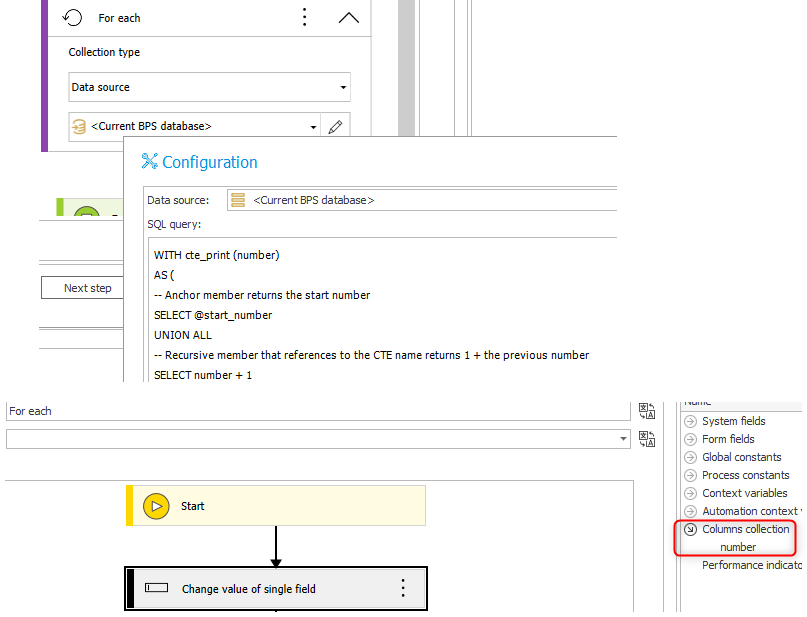
2. Create a for each
3. Change the collection type to data source and use "Current BPS database"
4. Add an SQL Statement to return the number of rows with the according number for example 1, 2 ,3 , 4.
5. Set "Meeting in x Days" to interval * row number
6. Calculate the "Next date" using the first date and the "Meeting in x Days" value
7. Start the workflow with the appropriate values.


For 3:
You could use this where you replace 7 with the number of intervals
https://www.codelabs365.com/sql-cookbook/sql-server/tsql-generate-numbers-table-for-a-range-of-numbers/

WITH cte_print (number)
AS (
-- Anchor member returns the start number
SELECT 1
UNION ALL
-- Recursive member that references to the CTE name returns 1 + the previous number
SELECT number + 1
FROM cte_print
WHERE number < 7 -- Termination condition for recursive call
)
SELECT *
FROM cte_print


Alternatively you could create a fixed value list with a few numbers and use the filter dialog.

Best regards,
Daniel

MVP

Hi,
I'd say there are multiple ways to do it, the one that feels most natural for me is an Start Workflow (SQL) action*.
Inside of the data part you can put in a query like this:

WITH Numbers AS (
SELECT 1 AS n
UNION ALL
SELECT n + 1 FROM Numbers WHERE n < 12 -- Limit of meetings
)
SELECT
n AS AppointmentNumber,
DATEADD(DAY, (n - 1) * 3, CAST('2025-11-18' AS DATE)) AS AppointmentDate -- Occurrence *3
...
... here just use values from the picker and alias them as column names,
...
FROM Numbers
OPTION (MAXRECURSION 12); -- This should be equal to limit value,

You could also create a list item on the form, and create a list of meetings visible to the user (form rules can add items to the list), and then using for each operator just create a meeting based on the rows.

* https://docs.webcon.com/docs/2026R1/Studio/Action/Workflow/StartManyWorkFlows/