Home > Forum > Tips&Tricks > Business rule in html template

Business rule in html template
0

Hi

Is there any way to use business rule references when generating HTML templates? Something like {BRD:63630e35-0f8d-455e-ac6f-df8017e01c56}.
I see that you can reference them in Word documents, and it works for me, e.g., {DOCPROPERTY BPSGUID_BRD:d5280b12-fad7-4dd6-9031-4b74f121c1c2_numer2}.
How can I use this in HTML?

And another question: how do I map arguments to a business rule already used in HTML?

Thank you.
Maciej

Hi Maciej,

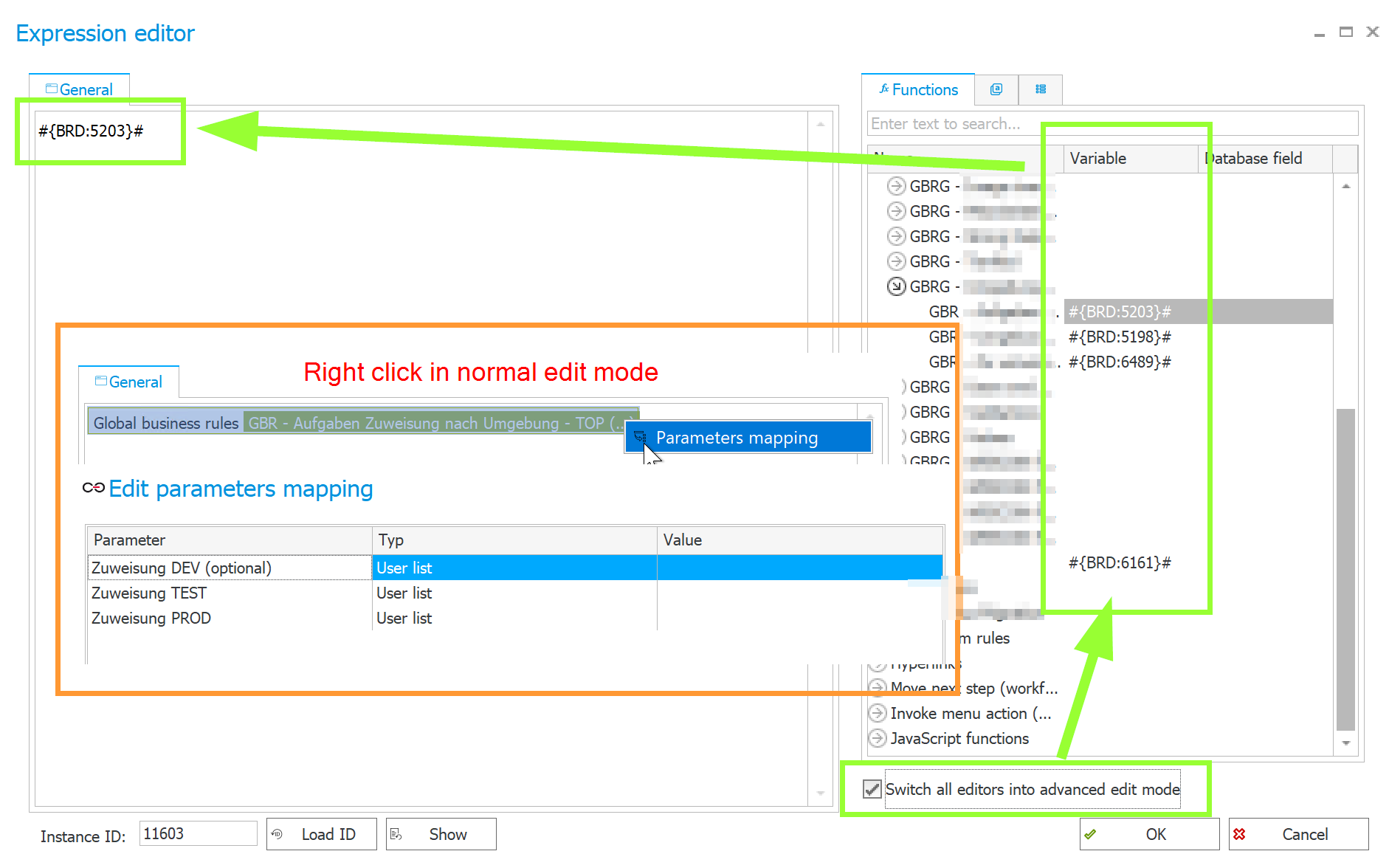
yes, you can enable the option "Switch all editors into advanced edit mode" and then you get the reference code in the format #{BRD:xxxx}#. xxxx is the normal ID and not the GUID. Unique GUID is needed if you have artifacts across environments like a document template because the normal ID isn't unique across environments.

When you are in the normal edit mode you just have to do a right klick on the business rule and you can choose "Parameters mapping".

You can see everything in the screenshot.

Kind regards
Sébastien