Home > Forum > General > Deploying One DEV Master Application to Multiple Independent PROD Applications with Update Support

Deploying One DEV Master Application to Multiple Independent PROD Applications with Update Support
0

We want to develop and maintain one master application in DEV and deploy it as multiple independent applications in the same PROD environment.

Example:
- DEV: Generic Approval
- PROD: Approval Department A
- PROD: Approval Department B

Both production applications must have separate workflow instances, permissions and configurations.

When we fix a bug or extend the master application in DEV, we need to deploy that update to both existing PROD applications without recreating them or losing existing workflow instances.

Does WEBCON BPS 2026 support this scenario through the standard import/export mechanism, custom import mappings or the Public Import API?

If yes, what is the officially supported procedure for maintaining the mappings between one source application and multiple target applications?

MVP

Hi Ernst

Creating a business unit for each of the departments could help you solving the permission parts of your problem.
You then configure the permissions on business unit level rather on generic level. And you also can have business unit dependent data sources.

In WEBCON you can share processes across other applications by creating a relation to a process.
For example, in application A you have the approval process, and in application B you add a relation to the approval process.
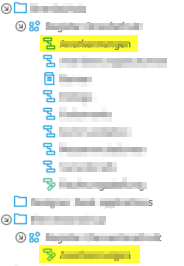
Linked processes you can identify by the green icon with the link.
This way you maintain the approval process once. You only have to export/import one application if you change the approval process.

The applications you share with different departments. Members of department A only has access to application A, and department B to application B.
As the departments have different applications you can configure the dashboard and reports individually.

We use this concepts for a some clients. One of them has 10 business units.

In reply to: Markus Jenni

Hi Ernst

Creating a business unit for each of the departments could help you solving the permission parts of your problem.
You then configure the permissions on business unit level rather on generic level. And you also can have business unit dependent data sources.

In WEBCON you can share processes across other applications by creating a relation to a process.
For example, in application A you have the approval process, and in application B you add a relation to the approval process.
Linked processes you can identify by the green icon with the link.
This way you maintain the approval process once. You only have to export/import one application if you change the approval process.

The applications you share with different departments. Members of department A only has access to application A, and department B to application B.
As the departments have different applications you can configure the dashboard and reports individually.

We use this concepts for a some clients. One of them has 10 business units.

Hi Markus,

Thanks for your suggestion! I'm familiar with related processes and business units. However, while we have many applications, the need to maintain multiple independent PROD applications from a single master is currently rather limited, so the additional complexity probably wouldn't be justified.

**As a feature request to WEBCON:**

It would be great if future versions supported something similar to the Notes/Domino design template concept.

For example, multiple independent applications in PROD could be linked to the same master template in DEV. When importing an updated version of the master, WEBCON could update all linked applications, including workflows, actions, business rules, reports, dashboards, dictionaries, etc., while preserving their individual workflow instances, permissions and application-specific configurations.

One limitation of the current template mechanism is worth mentioning: I can export an application as a template and import it into PROD, creating an independent application. However, this new application is no longer linked to its original DEV application for subsequent deployments.

As a result, I cannot maintain it through the usual DEV → TEST → PROD deployment process using the original application as the source. Instead, I would need to maintain the new application separately in PROD or create a corresponding DEV application and establish its own deployment path.

It would be great if template-based applications could retain a link to their master, allowing updates to be deployed through the normal environment chain.

Thanks again for your input!

MVP

Hi Ernst,

maybe I'm missing something, but I don't see the benefit. The business entities fulfill your requirements.

The only alternative would be to create an own database. This may be an option, especially if these departments require that their data is separated on a physical level.

Otherwise the additional databases only introduce additional complexity.
The business entities support the separated permissions and the configuration can be done with dictionaries. Constants aren't suited for storing context depending information.

Best regards,
Daniel

In reply to: Franek

Hi, wouldn't creating a new content database satisfy your requirement?

Hi Markus, Daniel and Franek,

Thanks for your suggestions. Let me explain my requirement using a more realistic example from our current development.

**Example: A generic Ticket Management application**

We are developing a ticket management application in WEBCON that consists of much more than a single workflow:

- A main ticket workflow
- Several sub-workflows (incoming mail processing, automated tickets, etc.)
- Multiple dashboards, reports and application pages
- Several dictionaries for configuration
- Business rules, actions and other application logic

The application already supports multiple teams within a department. Each team can have its own configuration, Express Tickets, views, etc.

**Now consider a second department with four completely different teams.**

This department wants exactly the same ticket management functionality, including all workflows, sub-workflows, dashboards, reports, dictionaries and presentation logic.

Of course, its tickets, teams, permissions and configuration must remain independent of the first department.

As far as I understand, Related Processes allow sharing workflow definitions between applications, but not the complete application presentation layer (dashboards, reports, homepage, etc.).

In our case, a significant amount of functionality and logic will also be implemented in that presentation layer.

Therefore, neither Related Processes nor separate Content Databases appear to solve the actual maintenance problem.

**What I would like to achieve is:**

1. Develop and maintain one complete "Generic Ticket Management" master application in DEV.
2. Create any number of independent applications from that master, for example "Tickets Department A", "Tickets Department B", etc.
3. Each derived application has its own workflow instances, teams, permissions, dictionaries and configuration data.
4. When the master application is updated in DEV (new dashboard functionality, modified report, improved mail processing, additional business rules, etc.), deploy those design changes to all derived applications through the normal DEV → TEST → PROD deployment process.
5. Preserve the existing workflow instances, application-specific configuration and permissions in each target application.

In other words, **I want to reuse and maintain the entire application design, not just individual processes.**

This is conceptually similar to Notes/Domino Design Templates, where multiple independent databases inherit design changes from one master template.

I understand that WEBCON currently supports exporting an application as a template and creating independent applications from it. However, the connection to the original master is not retained for subsequent updates.

**My feature request is to extend this mechanism so that derived applications retain their relationship to the master and can receive future design updates.**

I hope this example makes the distinction clearer.

Best regards,
Ernst

MVP
In reply to: Ernst Siderits (HYPO NOE)

Hi Markus, Daniel and Franek,

Thanks for your suggestions. Let me explain my requirement using a more realistic example from our current development.

**Example: A generic Ticket Management application**

We are developing a ticket management application in WEBCON that consists of much more than a single workflow:

- A main ticket workflow
- Several sub-workflows (incoming mail processing, automated tickets, etc.)
- Multiple dashboards, reports and application pages
- Several dictionaries for configuration
- Business rules, actions and other application logic

The application already supports multiple teams within a department. Each team can have its own configuration, Express Tickets, views, etc.

**Now consider a second department with four completely different teams.**

This department wants exactly the same ticket management functionality, including all workflows, sub-workflows, dashboards, reports, dictionaries and presentation logic.

Of course, its tickets, teams, permissions and configuration must remain independent of the first department.

As far as I understand, Related Processes allow sharing workflow definitions between applications, but not the complete application presentation layer (dashboards, reports, homepage, etc.).

In our case, a significant amount of functionality and logic will also be implemented in that presentation layer.

Therefore, neither Related Processes nor separate Content Databases appear to solve the actual maintenance problem.

**What I would like to achieve is:**

1. Develop and maintain one complete "Generic Ticket Management" master application in DEV.
2. Create any number of independent applications from that master, for example "Tickets Department A", "Tickets Department B", etc.
3. Each derived application has its own workflow instances, teams, permissions, dictionaries and configuration data.
4. When the master application is updated in DEV (new dashboard functionality, modified report, improved mail processing, additional business rules, etc.), deploy those design changes to all derived applications through the normal DEV → TEST → PROD deployment process.
5. Preserve the existing workflow instances, application-specific configuration and permissions in each target application.

In other words, **I want to reuse and maintain the entire application design, not just individual processes.**

This is conceptually similar to Notes/Domino Design Templates, where multiple independent databases inherit design changes from one master template.

I understand that WEBCON currently supports exporting an application as a template and creating independent applications from it. However, the connection to the original master is not retained for subsequent updates.

**My feature request is to extend this mechanism so that derived applications retain their relationship to the master and can receive future design updates.**

I hope this example makes the distinction clearer.

Best regards,
Ernst

Hi Ernst

Based on your last description, creating a business unit for each department should help to solve your problem.
As the departments on DEV and PROD are different, I suggest that you filter teams, permissions, dictionaries and configuration data by the business unit whenever you use those.

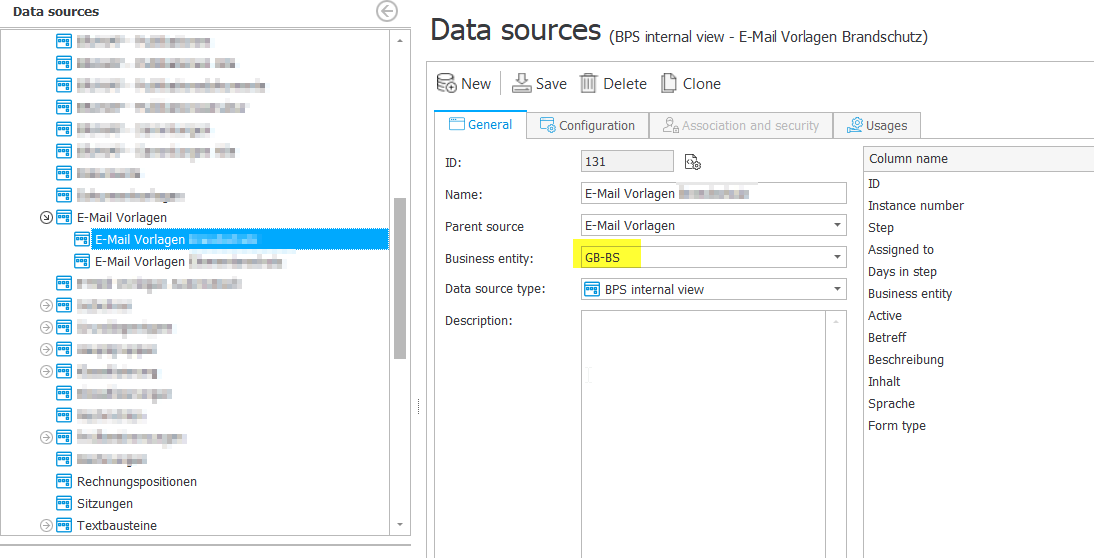
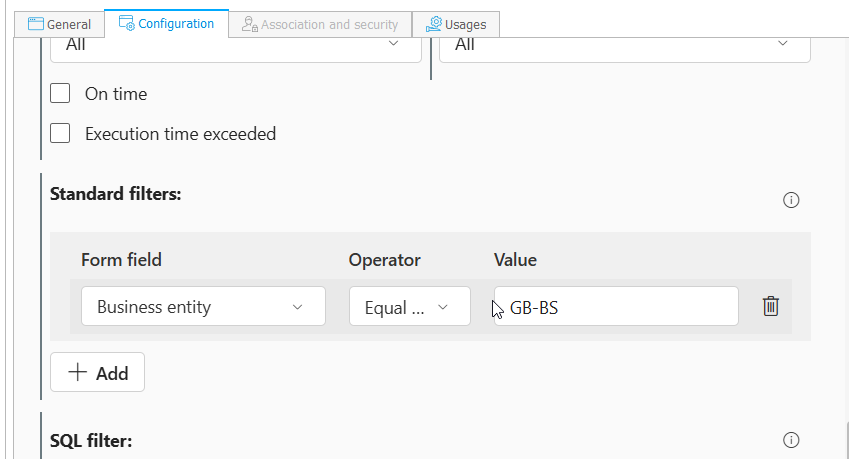
Alternatively you could create sub data sources on the PROD environment. These data sources you assign the business unit and set the filter to the same. When using this type of data source, the data is always provided for the corresponding business unit. The fields in the main and sub data sources need to be same as well. As long as you don't have a change in the main data source, it is doable.
BUT: You should not import them again otherwise they will get lost.


The standard dictionary data source does not have the business unit exposed, so you will have to create internal views (but don't forget to add a custom column for WFD_Guid). Hopefully at some time in the future, our user voices will be heard.

We are using both options, but usually we have the same business units on DEV and PROD. So you need to be careful to not to overwrite the business units

In reply to: Markus Jenni

Hi Ernst

Based on your last description, creating a business unit for each department should help to solve your problem.
As the departments on DEV and PROD are different, I suggest that you filter teams, permissions, dictionaries and configuration data by the business unit whenever you use those.

Alternatively you could create sub data sources on the PROD environment. These data sources you assign the business unit and set the filter to the same. When using this type of data source, the data is always provided for the corresponding business unit. The fields in the main and sub data sources need to be same as well. As long as you don't have a change in the main data source, it is doable.
BUT: You should not import them again otherwise they will get lost.


The standard dictionary data source does not have the business unit exposed, so you will have to create internal views (but don't forget to add a custom column for WFD_Guid). Hopefully at some time in the future, our user voices will be heard.

We are using both options, but usually we have the same business units on DEV and PROD. So you need to be careful to not to overwrite the business units

Hi Markus,

Thanks for the detailed explanation. I understand your approach, and I agree that Business Units could be used to implement this scenario within a single application.

However, this would introduce another level of context-dependent logic throughout an already complex application.

Our ticket application already supports multiple teams within each department, including team-specific dashboards, reports, Express Tickets, mail processing and configuration.

Adding Business Units would mean that many of these components would also need to become department-aware.

My intention is to avoid this additional complexity by keeping each department's application independent, while maintaining their common design centrally.

So I fully understand that Business Units are a possible architectural alternative, but my feature request is specifically about **one-to-many application design inheritance and deployment**, rather than implementing multiple departments within a single application.

Thanks again for your input!

Best regards,
Ernst