
AI Agents – Business use case
Applies to version: 2026 R1 and above; author: Lily Adamowicz. Adrian Baszak
Related documentation
A detailed description of the functionalities mentioned herein and their configuration can be found in the following sections of the WEBCON Help:
Other related Community articles include:
Introduction
AI Agents are intelligent digital workers that can be assigned to specific workflow steps to automatically execute instructions defined in natural language. This enables partial or full automation of tasks that previously required manual content creation or data analysis. In the context of CRM processes, AI Agents prove particularly useful in areas such as customer service, reporting, and post-meeting documentation.
For the purpose of this example, a CRM process has been designed consisting of two separate workflows:
- Meeting notes – a workflow responsible for creating, processing, and distributing meeting summaries.
- Meeting preparation – a workflow that supports users in planning and preparing for upcoming meetings.
The goal of the overall process is to provide comprehensive support throughout the client meeting lifecycle — from capturing meeting outcomes, through drafting notes and communication, to planning subsequent interactions.
Workflow 1: Meeting notes
The first workflow is designed to process meeting recordings, generate transcriptions, and create two types of summaries:
- internal, intended for the project team,
- external, addressed to the client in the form of an email.
The following steps were added to the process:

The recording transcription is performed at the Transcription step using the AI Create transcription action, which converts the attached audio file into text. Subsequently, two summaries — internal and external — are generated with the help of AI Agents.
For this workflow, a process constant named Agent – scribe was created. This constant defines the role of the AI Agent and allows it to be reused across different workflow steps. The constant is assigned to all steps where the AI Agent is created.

Step: Internal summary
The AI Agent was configured to produce a concise meeting summary intended solely for internal use by the project team. The AI Agent’s instruction was defined as follows:
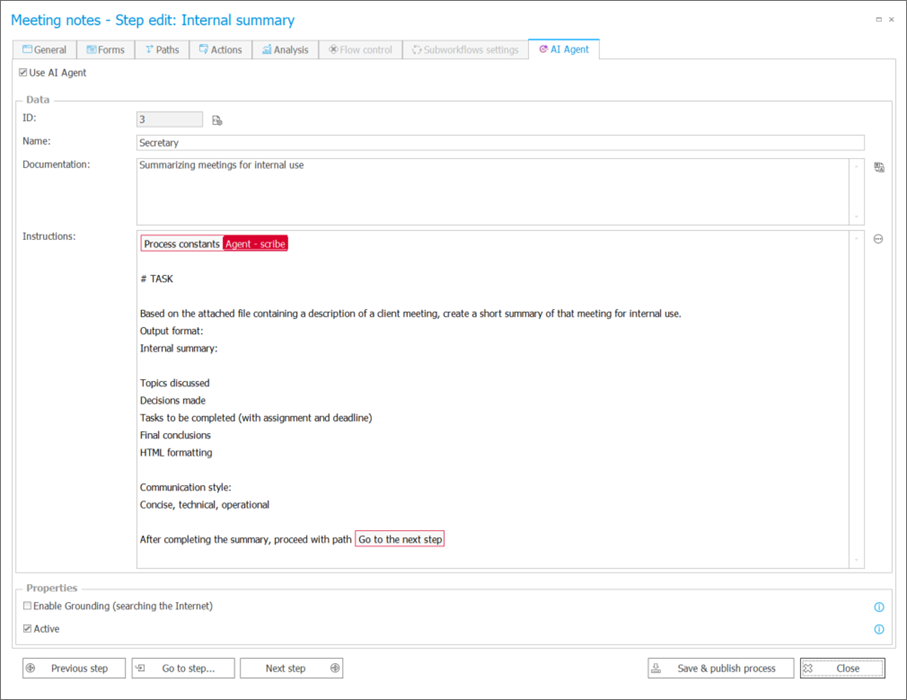
The instructions leverage the previously defined process constant specifying the AI Agent’s role and provide detailed guidance on the structure, style, and the workflow path the process instance should follow after the AI Agent completes its jobs. This ensures that all generated summaries maintain a consistent format, linguistic coherence, and are routed to the appropriate workflow step.
Step: Client summary
In the subsequent step, the same AI Agent is used to draft an email addressed to the client. The AI Agent’s job is defined as follows:
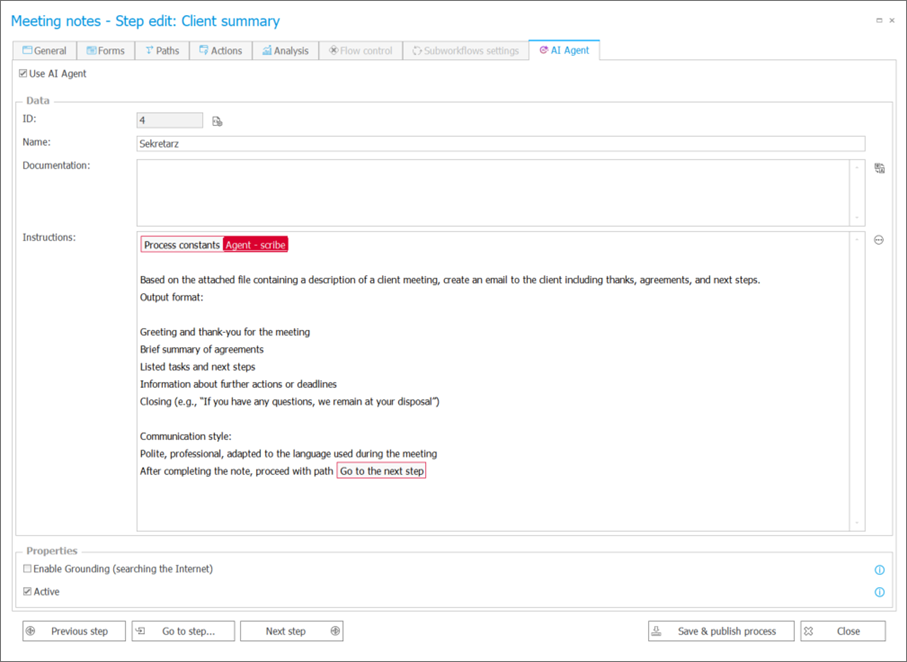
The instructions specify the message structure, editorial style, and communication context. This allows the AI Agent to automatically generate an email with a consistent tone and format, tailored to the client’s communication style. Reusing the process constant ensures a clear and consistent definition of the AI Agent’s role within the workflow.
In the following step — Author verification — the user responsible for the meeting can review the content generated by the AI Agent, make any necessary edits, and approve the document for sending.
Workflow 2: Meeting preparation
The second CRM workflow is designed to assist users in preparing for upcoming client meetings. In this scenario, the AI Agent job is to gather key information from previous meetings and propose an agenda for the next session.
The workflow was structured as follows:
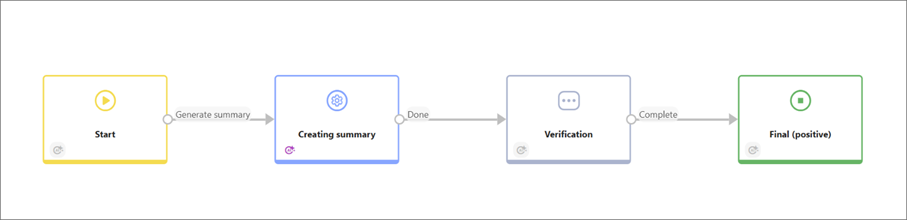
At the Creating summary step, an AI Agent was added to perform the following job:
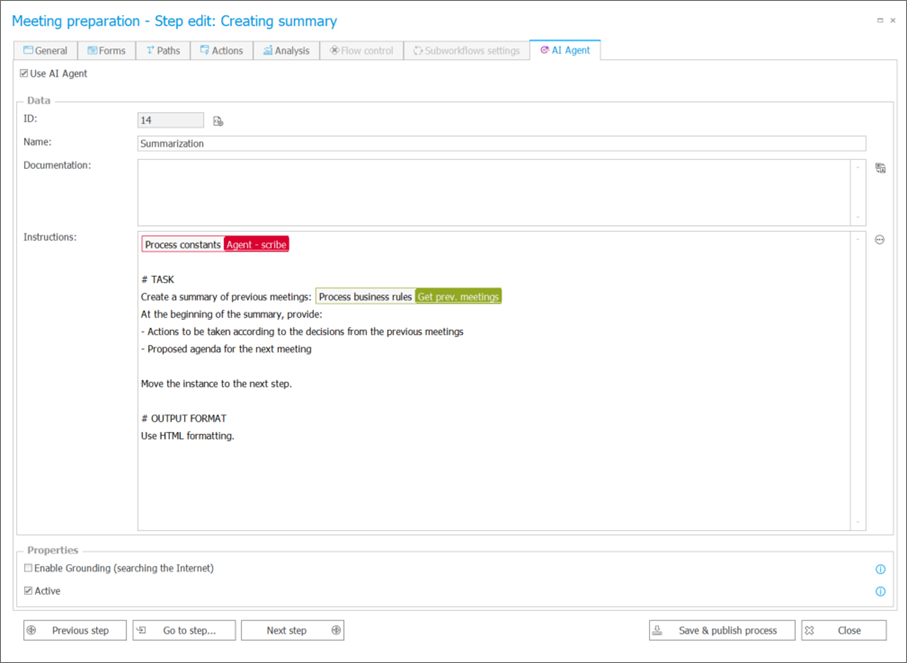
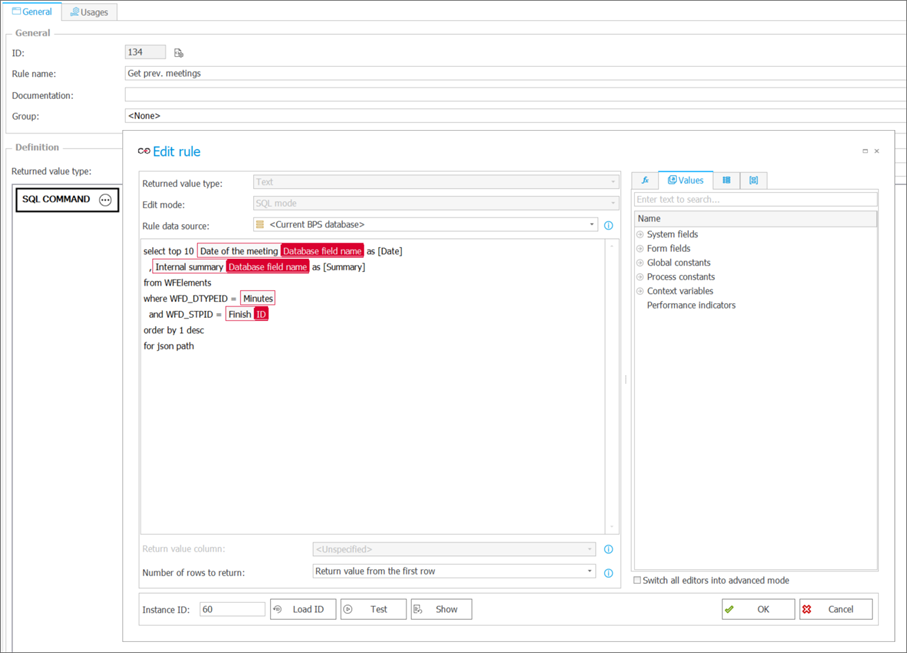
This step also utilizes the process constant Agent – scribe, which defines the context and role of the AI Agent within the workflow. Input data, such as notes and summaries from previous meetings, are automatically retrieved using a business rule (SQL Command) that extracts the relevant information from the database.
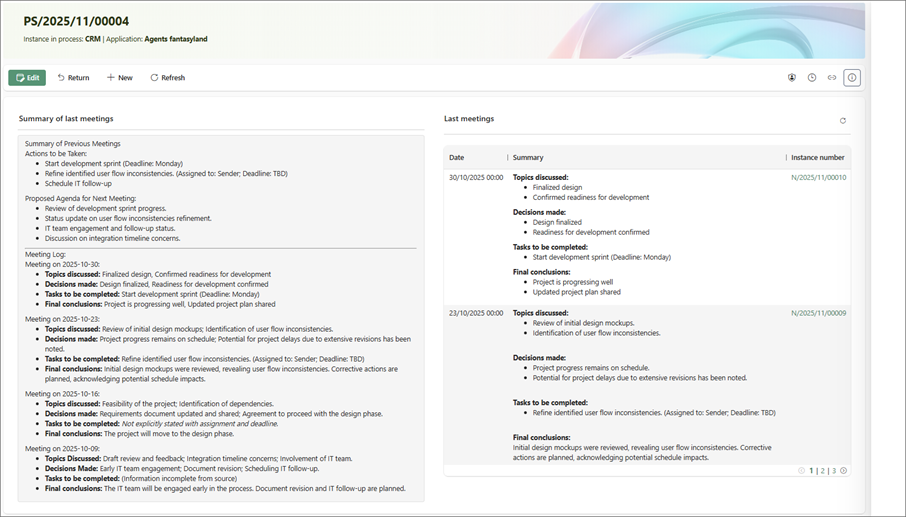
In the subsequent Verification step, the user can review the summary generated by the AI Agent, make any necessary edits, and finalize approval of the content.
Summary
This business use case demonstrates that implementing AI Agents within CRM workflows enables flexible, context-aware task automation. By leveraging object identifiers (e.g., workflow paths the instance should follow, as in the examples) and business rules (e.g., SQL Command retrieving data from the database), AI Agents can generate dynamic content tailored to the current workflow context.
This approach allows the creation of intelligent scenarios in which messages, summaries, or action proposals automatically adapt based on source data, instance status, or the current user role. As a result, CRM processes become more responsive, accurate, and aligned with the organization’s real needs.

+48 12 443 13 90