28.10.2022
 08:54
08:54
Hello,
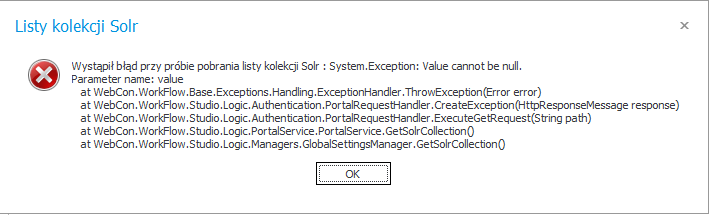
after restarting server on which we have installed webcon 2021.1.3.188 (freemium) there is some problem with SOLR.
Similar problem is in thread https://community.webcon.com/forum/thread/776 but solution which community suggest there doesn't help me.
I've tried to restart Webcon WorkFlow Service but it's still not work.
In log:
Message=SOLR not initialized
Source=WebCon.WorkFlow.Data.Solr
StackTrace= at WebCon.WorkFlow.Data.Solr.BPSSolrServerProxy.GetInstance[T]()
at WebCon.WorkFlow.Data.Solr.DirectSolrIndexAdder.AddToIndex(BPSActivity activity, ActivityTypes type)
at WebCon.WorkFlow.Base.Solr.SolrLogger.AddWithDirectSolrAdder(BPSActivity activity, ActivityTypes activityType)
InnerException:
Message=SOLR not initialized
Source=WebCon.WorkFlow.Data.Solr
StackTrace= at WebCon.WorkFlow.Data.Solr.BPSSolrServerProxy.GetInstance[T]()
at WebCon.WorkFlow.Data.Solr.DirectSolrIndexAdder.AddToIndex(BPSActivity activity, ActivityTypes type)
at WebCon.WorkFlow.Base.Solr.SolrLogger.AddWithDirectSolrAdder(BPSActivity activity, ActivityTypes activityType)
Outer stack trace:
at WebCon.WorkFlow.Common.Logging.BaseLogger.WriteToEventLog(WriteToSystemLogParams args)
at WebCon.WorkFlow.Base.Solr.SolrLogger.AddWithDirectSolrAdder(BPSActivity activity, ActivityTypes activityType)
at WebCon.WorkFlow.Base.Solr.SolrLogger.OpenDashboard(OpenDashboardSolrParams parameters)
at WebCon.BPSCloud.Core.SolrEngine.ActivityLogger.ActionOpenDashboard(Int32 dashboardId)
at lambda_method(Closure , Object , Object[] )
at Microsoft.AspNetCore.Mvc.Internal.ActionMethodExecutor.SyncActionResultExecutor.Execute(IActionResultTypeMapper mapper, ObjectMethodExecutor executor, Object controller, Object[] arguments)
at Microsoft.AspNetCore.Mvc.Internal.ControllerActionInvoker.<InvokeActionMethodAsync>d__12.MoveNext()
at System.Runtime.CompilerServices.AsyncTaskMethodBuilder.Start[TStateMachine](TStateMachine& stateMachine)
at Microsoft.AspNetCore.Mvc.Internal.ControllerActionInvoker.InvokeActionMethodAsync()
at Microsoft.AspNetCore.Mvc.Internal.ControllerActionInvoker.Next(State& next, Scope& scope, Object& state, Boolean& isCompleted)
at Microsoft.AspNetCore.Mvc.Internal.ControllerActionInvoker.<InvokeNextActionFilterAsync>d__10.MoveNext()
at System.Runtime.CompilerServices.AsyncTaskMethodBuilder.Start[TStateMachine](TStateMachine& stateMachine)
at Microsoft.AspNetCore.Mvc.Internal.ControllerActionInvoker.InvokeNextActionFilterAsync()....
That situation is annoying because we have message on portal.
Thank you for your help.