
 22.08.2024
 14:21
14:21
Hi,
It will by werry usefull to have this option in business rules.
Regards.
 22.08.2024
14:21
22.08.2024
14:21
Hi,
It will by werry usefull to have this option in business rules.
Regards.
23.08.2024
08:48
I would rather have an option to select it when putting the business rule somewhere, but I'm up for anything that will allow selecting behavior.
I'm currently using a technical field on the form, to avoid url encoding.
I thought there was similar user voice in the past but can't find it.
[2025.07.10, url encode, for search purposes]
23.08.2024
15:25
I would rather have an option to select it when putting the business rule somewhere, but I'm up for anything that will allow selecting behavior.
I'm currently using a technical field on the form, to avoid url encoding.
I thought there was similar user voice in the past but can't find it.
[2025.07.10, url encode, for search purposes]
I don't mind where, but I ___need___ the raw value. :)
11.09.2024
09:19
I don't mind where, but I ___need___ the raw value. :)
I've just run into this issue again when updating from BPS 2022 to 2024.
While there's a workaround for using business rules in REST actions I have yet to find one when they are used in REST data sources.
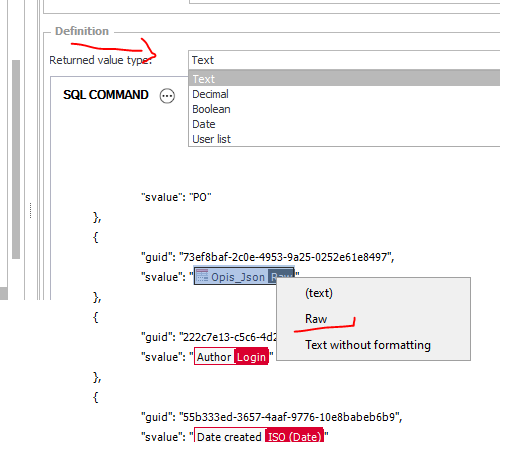
Workaround for REST actions:
- assigning the business rule to a form field
- select the form field and switch from text to raw mode by right clicking on it.
20.09.2024
14:04
Good suggestion. Let us see how to implement it the optimal way since there are potentially multiple implications.
I'm changing the status to "under review".
22.09.2024
11:51
Good suggestion. Let us see how to implement it the optimal way since there are potentially multiple implications.
I'm changing the status to "under review".
That's great. :)
At the moment I'm holding back a customer who want's to update from 2022 version due to this limitation.
Regarding "since there are potentially multiple implications."
Could you please verify the following use cases:
- Usage in data sources
For example by creating dynamic URLs, query parameters, headers, whatever
- Passing parameters
- Passing search value and column (popup search) as parameters
I've lost count on tickets I've created in this context.
23.09.2024
11:27
03.03.2025
16:40
Update:
Another six month have passed and the customer had to upgrade from WEBCON BPS 2022.
We used the business rule in a data source to create a dynamic REST filter. As expected this feature is no longer working, therefore I created a ticket:
This is my summary of the official response:
- We could create dynamic server side filtering using business rules up to WEBCON BPS 2022
- This feature has been (unintentionally) been remove in 2023
- There's some (slight) chance that it will be "revived".
- Even if the decision is positive, it will take a long time (quarters) until it will be available.
17.10.2025
03:01
Update:
Another six month have passed and the customer had to upgrade from WEBCON BPS 2022.
We used the business rule in a data source to create a dynamic REST filter. As expected this feature is no longer working, therefore I created a ticket:
This is my summary of the official response:
- We could create dynamic server side filtering using business rules up to WEBCON BPS 2022
- This feature has been (unintentionally) been remove in 2023
- There's some (slight) chance that it will be "revived".
- Even if the decision is positive, it will take a long time (quarters) until it will be available.
Hi,
You have one additional supporter, I think it would be a great feature.
I would even add a RAW TEXT mode for constants. (gets encoded as well)
We are also upgrading from 2022 to 2025, we need to change too many API actions just because this unreasonable change in the new version.
Workaround is to update a technical field and use RAW there, but it is not nice....
09.12.2025
22:45
I just hit another wall will this.
We have a choose field with the option to search for item number and item description. Until 2023 R1 it was possible to dynamically create a oData filter in a data source using a business rule.
Since then this was broken and the customer "just" had wait longer, as we could no longer do server side filtering.
Now we are facing a new issue. The number of the items exceeded the maximum threshold and now the external system is paging...
This isn't something WEBCON can handle.
The result is that the items on the second page can no longer be found.
Therefore, we needed to define whether we had to hardcode whether the number or description should be used for server side filtering. While this means, that filtering is faster, the customer employee can no longer select whether he want's to search for the description or the number.
It wasn't a pleasant discussion with the customer. He still remembered, that the behavior was different in the beginning...
06.03.2026
15:05
I just hit another wall will this.
We have a choose field with the option to search for item number and item description. Until 2023 R1 it was possible to dynamically create a oData filter in a data source using a business rule.
Since then this was broken and the customer "just" had wait longer, as we could no longer do server side filtering.
Now we are facing a new issue. The number of the items exceeded the maximum threshold and now the external system is paging...
This isn't something WEBCON can handle.
The result is that the items on the second page can no longer be found.
Therefore, we needed to define whether we had to hardcode whether the number or description should be used for server side filtering. While this means, that filtering is faster, the customer employee can no longer select whether he want's to search for the description or the number.
It wasn't a pleasant discussion with the customer. He still remembered, that the behavior was different in the beginning...
Hi,
I‘d like to view this feature in an upcoming version too!
It would be much easier without the workaround. Thanks for the hint, Daniel.
Kind regards
Sébastien
03.06.2026
07:50
Daniel, I've forwarded your suggestion to the devs.
Two years since this was forwarded to the devs, and still nothing? 🤔