In reply to: Michal Rykiert
This thread has the potential of setting a record-breaking number of comments. Now's your time, guys and gals! :)
This thread will surely break any record, at least if it not to many other threads are opened and this one goes to page two. :)
Back to topic:
#Improvements for lots of rows
We are quite often facing the situation, that we have hundreds of rows, which are used to plan new workflow instances.
The user sometimes needs to modify a columns of a few rows. In addition. there's often some kind of "status" column of which the user should only be able to select a few because the system will set the other status. For the later we used SQL data source:
select 0 as Option union
select 1 as Option where ColumnA = XYZ union
select 2 as Option where ColumnA = ABC
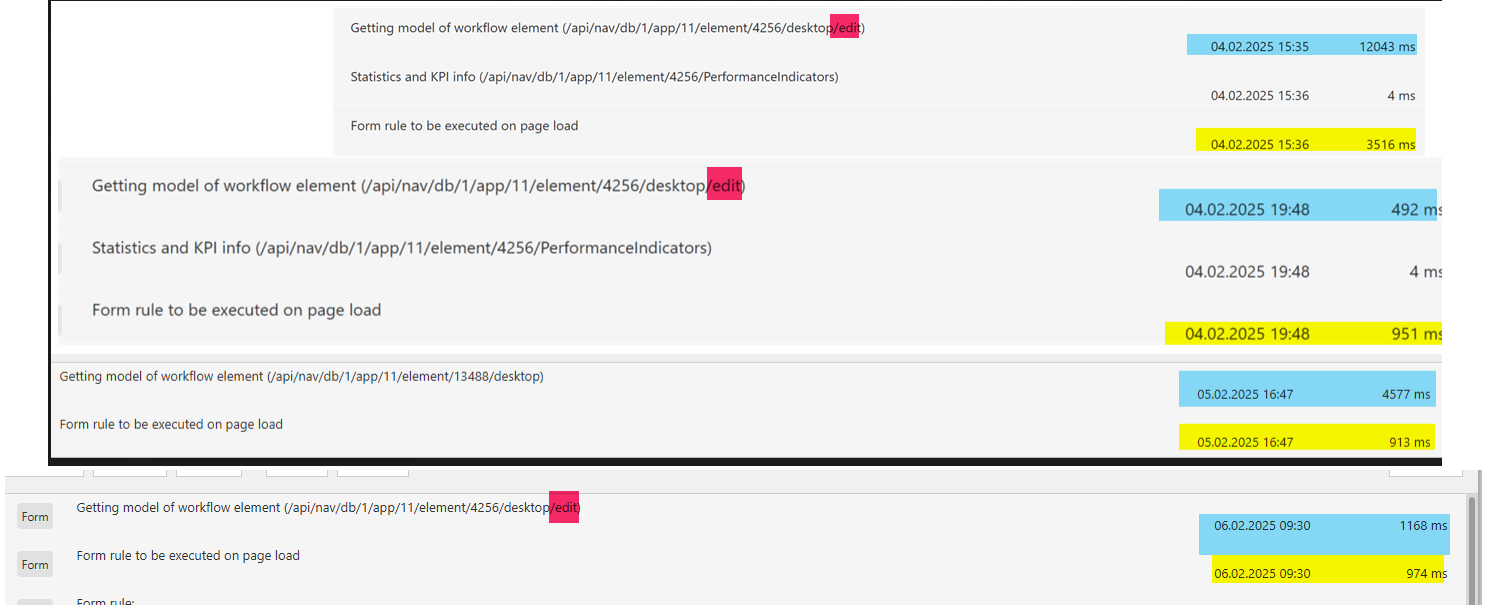
The drawback was that this SQL has been executed for each row. While a single execution is blazing fast, there are so many connections created that it can take seconds to execute all. You can see the different loading times in the attached screenshot.
What we did to improve the performance.
- Use data table if possible, even if the item list needs to be editable, hide it in view mode
While getting the data for the data table executes an additional SQL command, it's only a single one, instead one for the data and x commands for the other columns. In addition rendering the data table is way faster then the item list. I'm sure I also created a user voice, for restoring the function that some non editable fields should be rendered as text instead of deactivated inputs.
- We added a "filter option" by adding a field which is referenced by the data table to filter some rows. This only works in edit mode, but it helps.
- Hide the unavailable options with CSS
This reduced the SQL commands to a single on, as the result is reused for all rows.
Of course these are only workarounds, but this is what we faced. On a general level the following would help performance and user experience vice.
- Add support for paging, so that not all rows are rendered at the same time, even in edit mode.
- Add filtering options. finding a person in hundreds of rows isn't something I like.
# JS Rule improvements
- Add row with data
- Access a row without reference to the visible row number, which would break if we have paging anyway. Maybe a function could be provided to access a row using the DET_ID.
# Improvements for wide item lists
- Configure which columns can be "frozen", so that they are always visible
https://daniels-notes.de/posts/2023/freeze-item-list-column
- Provide an "Expand" option / only visible in single row edit window.
Example for the "Single row edit" option: https://daniels-notes.de/posts/2025/reduced-item-list-size
- Configuration option to show row actions on the left instead of right
This will especially help for wide item list, with lots of columns.
# Prioritize/change row order by drag & drop
If we are using item lists to create workflows for example tasks. it would be nice to change the order by adding drag & drop features. Of course, this will require a "sorting" column. We have done this in two projects.
# Define maximum number of item list rows:
https://daniels-notes.de/posts/2024/limit-number-of-item-list-rows
# Start/update another workflow instance with item list data
While we can work around it, by using the public API in an automation, this is no longer part of the SQL transaction and won't be rolled back in case of an error.
# Update single row edit dialog DOM with row information
Currently the single row edit dialog has no context which item list row is displayed:
https://community.webcon.com/forum/thread/5257?messageid=5257
# Add local parameters to form rule improvement
If you are doing calculations in a form rule, especially in a "for each", it would be great to have local parameters/variables. The current workaround is to call a JS form rule which will store the value and call another to get the value.
That's it for now. :)


 20.01.2026
 16:27
16:27