Home > Forum > Forms > 📣Call for Feedback: enhancements to the Item List

📣Call for Feedback: enhancements to the Item List
7

WEBCON

Dear Community Members,

As part of our ongoing efforts to improve Webcon, we are reviewing the current capabilities and future direction of the Item List feature.

I would like to invite you to share your feedback, ideas, and real-world use cases related to Item Lists. Your input will help us better understand practical needs and prioritize potential enhancements.

In particular, I am interested in:
- Limitations you encounter when working with Item Lists (why they matter in your business case, and what workarounds you currently use, if any)
- Missing functionalities or behaviors you would like to see added (please be as specific as possible and provide business context)
- Performance, usability, or configuration challenges you have experienced

Feel free to share both high-level suggestions and detailed, practical examples.
To keep this discussion focused and impactful, let’s prioritize critical improvements over “nice-to-have” features with limited business value — quality over quantity.
All feedback collected in this thread will be reviewed by the product team and considered in future development. At the same time, to manage expectations, this discussion does not imply any commitment to specific implementations or timelines.

I’m looking forward to your insights!

Dawid
WEBCON Product Manager

MVP
In reply to: Michal Rykiert

This thread has the potential of setting a record-breaking number of comments. Now's your time, guys and gals! :)

This thread will surely break any record, at least if it not to many other threads are opened and this one goes to page two. :)

Back to topic:

#Improvements for lots of rows
We are quite often facing the situation, that we have hundreds of rows, which are used to plan new workflow instances.
The user sometimes needs to modify a columns of a few rows. In addition. there's often some kind of "status" column of which the user should only be able to select a few because the system will set the other status. For the later we used SQL data source:
select 0 as Option union
select 1 as Option where ColumnA = XYZ union
select 2 as Option where ColumnA = ABC
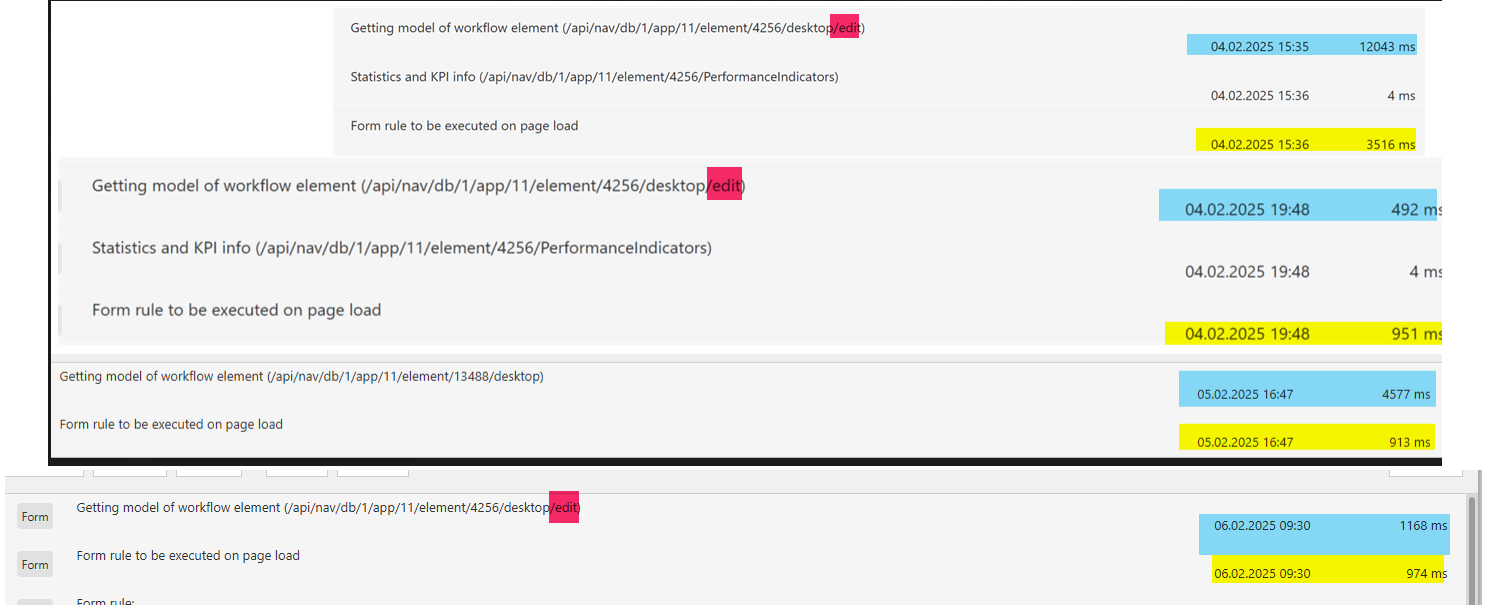
The drawback was that this SQL has been executed for each row. While a single execution is blazing fast, there are so many connections created that it can take seconds to execute all. You can see the different loading times in the attached screenshot.


What we did to improve the performance.
- Use data table if possible, even if the item list needs to be editable, hide it in view mode
While getting the data for the data table executes an additional SQL command, it's only a single one, instead one for the data and x commands for the other columns. In addition rendering the data table is way faster then the item list. I'm sure I also created a user voice, for restoring the function that some non editable fields should be rendered as text instead of deactivated inputs.
- We added a "filter option" by adding a field which is referenced by the data table to filter some rows. This only works in edit mode, but it helps.
- Hide the unavailable options with CSS
This reduced the SQL commands to a single on, as the result is reused for all rows.

Of course these are only workarounds, but this is what we faced. On a general level the following would help performance and user experience vice.
- Add support for paging, so that not all rows are rendered at the same time, even in edit mode.
- Add filtering options. finding a person in hundreds of rows isn't something I like.

# JS Rule improvements
- Add row with data
- Access a row without reference to the visible row number, which would break if we have paging anyway. Maybe a function could be provided to access a row using the DET_ID.

# Improvements for wide item lists
- Configure which columns can be "frozen", so that they are always visible
https://daniels-notes.de/posts/2023/freeze-item-list-column
- Provide an "Expand" option / only visible in single row edit window.
Example for the "Single row edit" option: https://daniels-notes.de/posts/2025/reduced-item-list-size
- Configuration option to show row actions on the left instead of right
This will especially help for wide item list, with lots of columns.

# Prioritize/change row order by drag & drop
If we are using item lists to create workflows for example tasks. it would be nice to change the order by adding drag & drop features. Of course, this will require a "sorting" column. We have done this in two projects.

# Define maximum number of item list rows:
https://daniels-notes.de/posts/2024/limit-number-of-item-list-rows

# Start/update another workflow instance with item list data
While we can work around it, by using the public API in an automation, this is no longer part of the SQL transaction and won't be rolled back in case of an error.

# Update single row edit dialog DOM with row information
Currently the single row edit dialog has no context which item list row is displayed:
https://community.webcon.com/forum/thread/5257?messageid=5257

# Add local parameters to form rule improvement
If you are doing calculations in a form rule, especially in a "for each", it would be great to have local parameters/variables. The current workaround is to call a JS form rule which will store the value and call another to get the value.

That's it for now. :)

In reply to: Daniel Krüger (DCCS)

This thread will surely break any record, at least if it not to many other threads are opened and this one goes to page two. :)

Back to topic:

#Improvements for lots of rows
We are quite often facing the situation, that we have hundreds of rows, which are used to plan new workflow instances.
The user sometimes needs to modify a columns of a few rows. In addition. there's often some kind of "status" column of which the user should only be able to select a few because the system will set the other status. For the later we used SQL data source:
select 0 as Option union
select 1 as Option where ColumnA = XYZ union
select 2 as Option where ColumnA = ABC
The drawback was that this SQL has been executed for each row. While a single execution is blazing fast, there are so many connections created that it can take seconds to execute all. You can see the different loading times in the attached screenshot.


What we did to improve the performance.
- Use data table if possible, even if the item list needs to be editable, hide it in view mode
While getting the data for the data table executes an additional SQL command, it's only a single one, instead one for the data and x commands for the other columns. In addition rendering the data table is way faster then the item list. I'm sure I also created a user voice, for restoring the function that some non editable fields should be rendered as text instead of deactivated inputs.
- We added a "filter option" by adding a field which is referenced by the data table to filter some rows. This only works in edit mode, but it helps.
- Hide the unavailable options with CSS
This reduced the SQL commands to a single on, as the result is reused for all rows.

Of course these are only workarounds, but this is what we faced. On a general level the following would help performance and user experience vice.
- Add support for paging, so that not all rows are rendered at the same time, even in edit mode.
- Add filtering options. finding a person in hundreds of rows isn't something I like.

# JS Rule improvements
- Add row with data
- Access a row without reference to the visible row number, which would break if we have paging anyway. Maybe a function could be provided to access a row using the DET_ID.

# Improvements for wide item lists
- Configure which columns can be "frozen", so that they are always visible
https://daniels-notes.de/posts/2023/freeze-item-list-column
- Provide an "Expand" option / only visible in single row edit window.
Example for the "Single row edit" option: https://daniels-notes.de/posts/2025/reduced-item-list-size
- Configuration option to show row actions on the left instead of right
This will especially help for wide item list, with lots of columns.

# Prioritize/change row order by drag & drop
If we are using item lists to create workflows for example tasks. it would be nice to change the order by adding drag & drop features. Of course, this will require a "sorting" column. We have done this in two projects.

# Define maximum number of item list rows:
https://daniels-notes.de/posts/2024/limit-number-of-item-list-rows

# Start/update another workflow instance with item list data
While we can work around it, by using the public API in an automation, this is no longer part of the SQL transaction and won't be rolled back in case of an error.

# Update single row edit dialog DOM with row information
Currently the single row edit dialog has no context which item list row is displayed:
https://community.webcon.com/forum/thread/5257?messageid=5257

# Add local parameters to form rule improvement
If you are doing calculations in a form rule, especially in a "for each", it would be great to have local parameters/variables. The current workaround is to call a JS form rule which will store the value and call another to get the value.

That's it for now. :)

Hi, I'd like to suggest a functionality improvement for Item Lists.

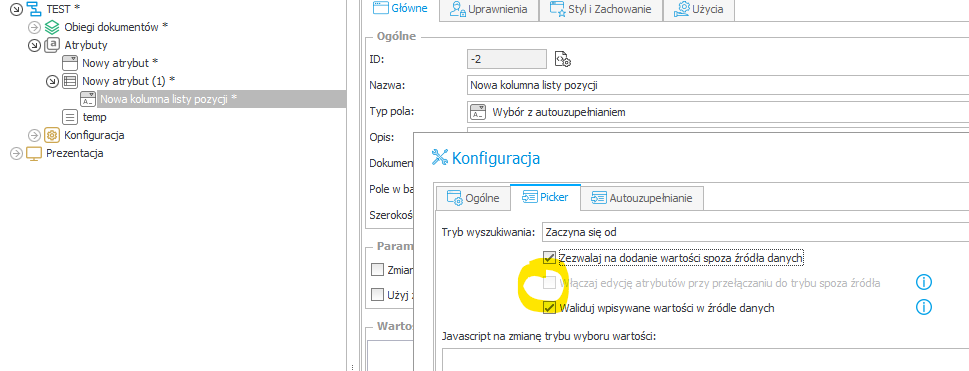
When configuring a standard Choice Field, in the "Picker" tab, enabling "Allow adding values not in data source" unlocks the option "Allow editing target fields when new value is added". This allows us to open a pop-up form to fill in details for the new entry.

However, when configuring a Choice Field on an Item List, looking at the same "Picker" tab section, the "Allow editing target fields..." checkbox is visible but permanently disabled/grayed out.

We frequently use Item Lists to create a "Bulk Registration" interface (e.g., submitting multiple separate requests or expenses in a single step). The goal is for a single row on the list to mirror the functionality of a standalone form.

Dear Community,
I’d like to propose a small but hopefully useful enhancement for item lists in WEBCON BPS:
the ability to keep the item list header visible while scrolling, similar to Excel’s “Freeze Top Row” feature.

When working with longer item lists, the column names disappear as soon as you scroll down. This makes it easy to lose track of what each column represents - especially in more complex solutions with many fields. A sticky header would greatly improve readability and reduce user errors.

Ideally, this could simply be exposed as an additional option in the item list configuration window.

Related user voice: https://community.webcon.com/forum/thread/2530?messageid=2530

MVP

Just a suggestion for now - we'll gather the rest as a team soon.

REQUEST
--------
Allow picture field as “new column”


USE CASE
---------
Specific use case – Audit Application:
We collect positive and negative incidents as individual instances that need to be processed.

Later, after the audit has been completed, all incidents are summarized in an ItemList in the main process, but without the option of displaying the source images.

Here, we currently copy the PDFs from the individual incident into the main process and then combine everything into a single overall audit PDF.

This would no longer be necessary if the images (reduced in size, of course) were already part of the summary ItemList.

Hi everyone,

I would like to share a specific use case that we are currently reusing across several of our processes:
1. Current usage & implementation
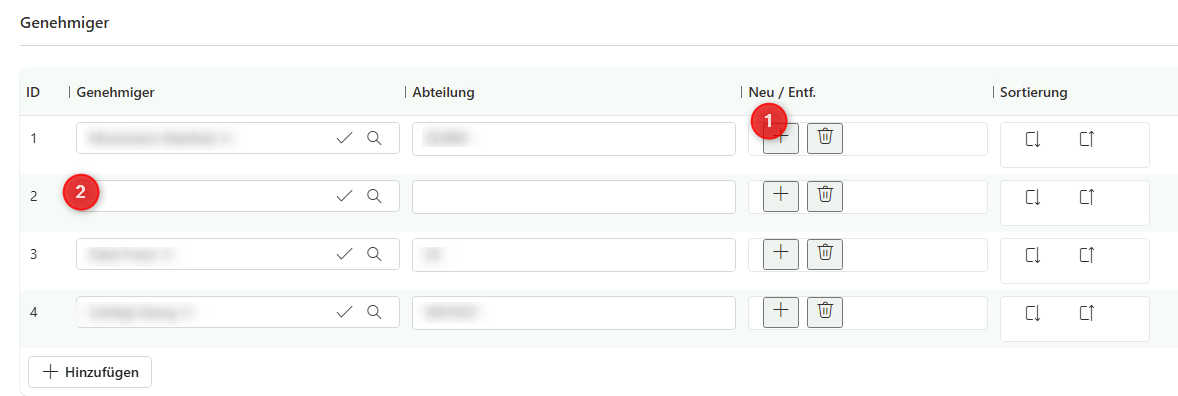
To provide a better user experience and more flexibility, we have implemented the following custom logic (see attached pictures):
• Row Reordering: We use custom "Up" and "Down" buttons to adjust the sequence of rows directly on the form. This is essential for our sequential approval workflows, where the row order determines the order of the approval steps.
• Row Management: We have realized our own "Add" and "Delete" buttons directly within the rows to create, remove, and re-sort entries on the fly.

2. General: Consistency & User Expectations
Users expect the same filtering experience as in WEBCON Reports. For large lists, filtering by columns like "Department" is essential for a consistent UX.

MVP
In reply to: Daniel Krüger (DCCS)

This thread will surely break any record, at least if it not to many other threads are opened and this one goes to page two. :)

Back to topic:

#Improvements for lots of rows
We are quite often facing the situation, that we have hundreds of rows, which are used to plan new workflow instances.
The user sometimes needs to modify a columns of a few rows. In addition. there's often some kind of "status" column of which the user should only be able to select a few because the system will set the other status. For the later we used SQL data source:
select 0 as Option union
select 1 as Option where ColumnA = XYZ union
select 2 as Option where ColumnA = ABC
The drawback was that this SQL has been executed for each row. While a single execution is blazing fast, there are so many connections created that it can take seconds to execute all. You can see the different loading times in the attached screenshot.


What we did to improve the performance.
- Use data table if possible, even if the item list needs to be editable, hide it in view mode
While getting the data for the data table executes an additional SQL command, it's only a single one, instead one for the data and x commands for the other columns. In addition rendering the data table is way faster then the item list. I'm sure I also created a user voice, for restoring the function that some non editable fields should be rendered as text instead of deactivated inputs.
- We added a "filter option" by adding a field which is referenced by the data table to filter some rows. This only works in edit mode, but it helps.
- Hide the unavailable options with CSS
This reduced the SQL commands to a single on, as the result is reused for all rows.

Of course these are only workarounds, but this is what we faced. On a general level the following would help performance and user experience vice.
- Add support for paging, so that not all rows are rendered at the same time, even in edit mode.
- Add filtering options. finding a person in hundreds of rows isn't something I like.

# JS Rule improvements
- Add row with data
- Access a row without reference to the visible row number, which would break if we have paging anyway. Maybe a function could be provided to access a row using the DET_ID.

# Improvements for wide item lists
- Configure which columns can be "frozen", so that they are always visible
https://daniels-notes.de/posts/2023/freeze-item-list-column
- Provide an "Expand" option / only visible in single row edit window.
Example for the "Single row edit" option: https://daniels-notes.de/posts/2025/reduced-item-list-size
- Configuration option to show row actions on the left instead of right
This will especially help for wide item list, with lots of columns.

# Prioritize/change row order by drag & drop
If we are using item lists to create workflows for example tasks. it would be nice to change the order by adding drag & drop features. Of course, this will require a "sorting" column. We have done this in two projects.

# Define maximum number of item list rows:
https://daniels-notes.de/posts/2024/limit-number-of-item-list-rows

# Start/update another workflow instance with item list data
While we can work around it, by using the public API in an automation, this is no longer part of the SQL transaction and won't be rolled back in case of an error.

# Update single row edit dialog DOM with row information
Currently the single row edit dialog has no context which item list row is displayed:
https://community.webcon.com/forum/thread/5257?messageid=5257

# Add local parameters to form rule improvement
If you are doing calculations in a form rule, especially in a "for each", it would be great to have local parameters/variables. The current workaround is to call a JS form rule which will store the value and call another to get the value.

That's it for now. :)

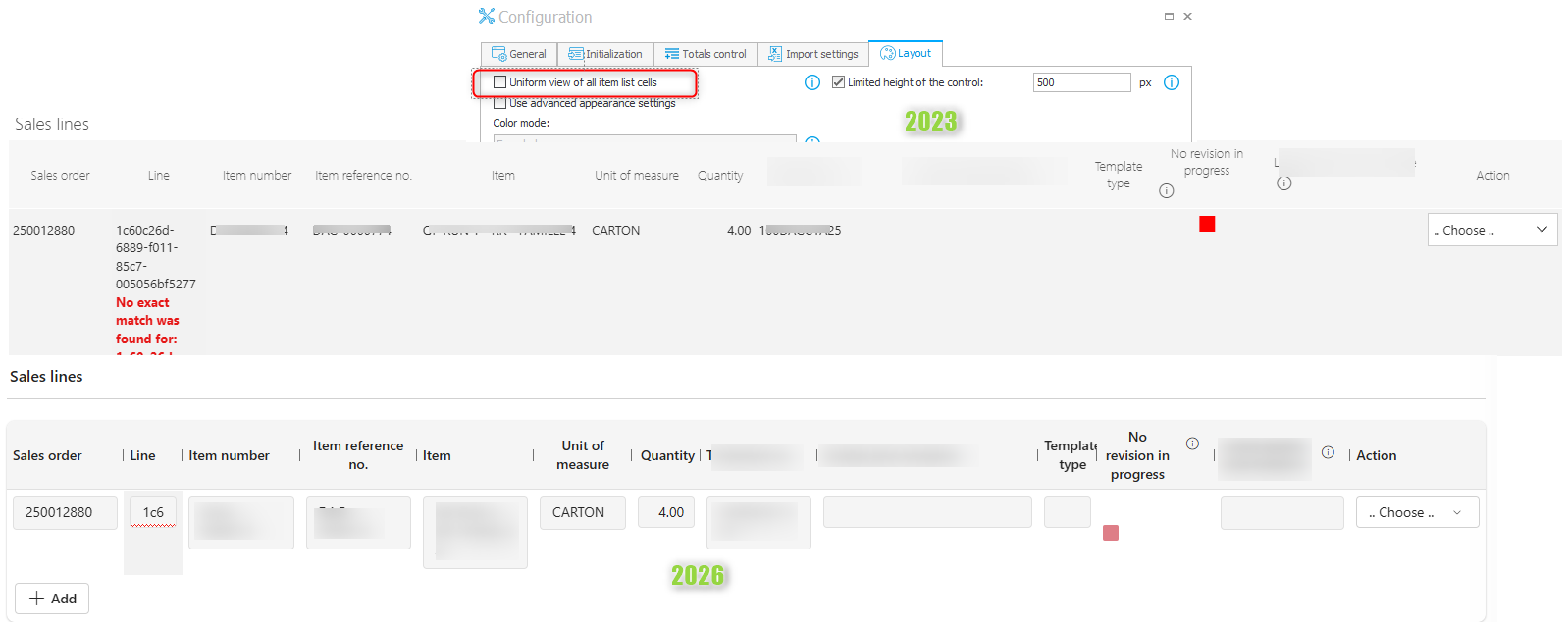
I'm currently upgrading from 2023 to 2026 and encountered a great example why it would be great to resurrect the "Uniform view of all item list cells".
I doubt anyone can argue, that the new "uniform" design looks better than the old one. Especially if you would have multiple rows and the one in the screenshot wouldn't thrown an error, which isn't even visible in 2026.

Update:
I can't even read the value of some cells...

A highly valuable enhancement would be the ability to import Item List rows from an Excel (.xlsx) file with support for default values defined in the Item List configuration. In real-life scenarios, imported data is often intentionally partial - some columns are relevant only for specific rows, while others should always fall back to standard values (e.g. VAT rate, cost type, cost center). When a cell is empty in Excel, the import should automatically apply the configured default instead of treating it as EMPTY or invalid. This is critical when importing hundreds of rows, as it removes the need for artificial data completion, preprocessing scripts, or manual corrections, and makes Excel import more usable in business processes rather than just a raw data upload.

It would be extremely helpful if we could, directly from business rule or a function select specific row - by column/key.
Also return previous row. We now have function that changes currently edited row. Often it would be useful to reference previously modified row, or the „one above”.
I recently had to implement list where new item should be increased by some value (date + day but retain time) and can’t find a way to easily reference the previous row (or by row value).

In reply to: Marcin Stachera - Marcopol

It would also be great to be able to freeze selected columns. And the ability to paginate the item list. Last time, when the page contained 2000 rows, it took ages to load :)

Dear Forum,

Item list performance and poor user experience with item lists that have a large number of columns or rows are among the most important issues. From a user interface perspective, working with an item list that scrolls horizontally while the first column disappears is problematic. The same applies to vertical scrolling when the list header becomes invisible.
A useful feature would also be automatic adjustment to the content size within configurable minimum and maximum width parameters. This could work similarly to Excel, for example by double-clicking on a column border.
Finally, it would be beneficial to open a single-row edit window by double-clicking any cell in a row, even when the number of rows is small. Using a form view might be more convenient for data entry.

Regards
Jaroslaw

MVP

I'm just recreating something what I did a few times which could be a great addition.

We have sometimes the use case, that we have a menu button which does something with the item list. For example a complex refresh, which requires data from multiple source.
In these cases we are using an HTML field to display a button next to the item list, which triggers the menu button.

It would be great to have an option which menu buttons should be displayed near the item list as additional actions. Maybe these could be displayed at the top or the bottom.

Dear all,

I would appreciate an extension of the "acceptance feature".
We have a frequent usecase that we want to either hide or make inactive rows where a certain condition is given. E.g. "hide all rows where the checkbox 'done' is true". In order to achieve this I have to bend the acceptance feature a good bit.
https://community.webcon.com/forum/thread/552?page=1#m6830

If it would be possible to set any condition instead of going via the detour of the "current user" as in my workaround.

Kind regards
Klaus