
Home > Forum > General > Design error on mobile phone when adding attachment

Design error on mobile phone when adding attachment
0

Hello everyone,
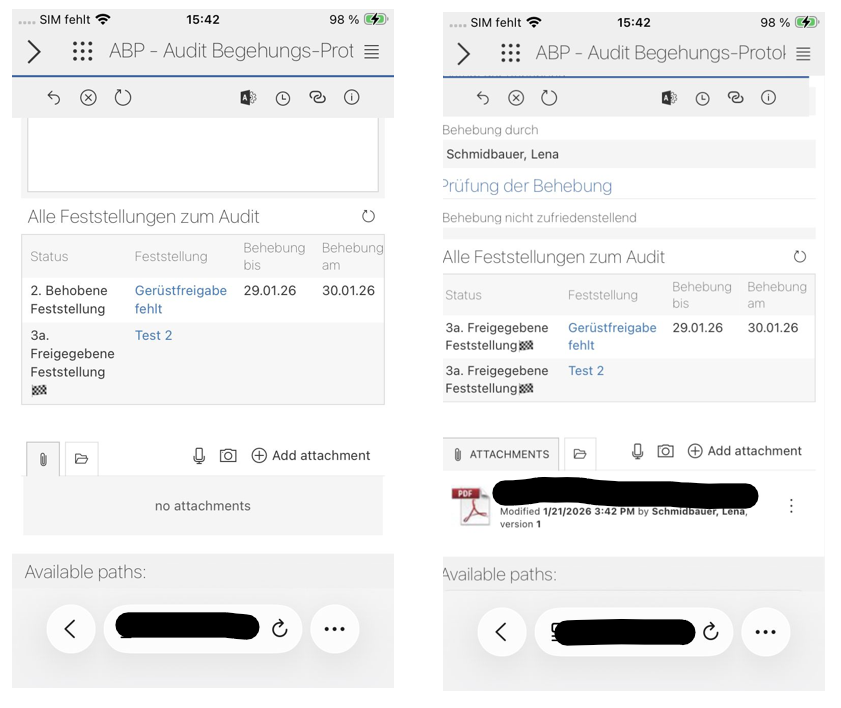
When testing applications with attachments on mobile phones (both Android and iPhone), the form is cut off on the left side.
The current assumption is that this is due to the size of the attachment box. If the attachment is empty, only the paperclip icon is displayed. However, if there is a file in the attachment, the word “Attachment” is written out and the design error occurs.

Has anyone else had the same problem? Or does anyone know a solution for it?
In reply to: Lena Schmidbauer

Hello,
Designer Studio: version 2024.1.1.248
mobile app: version 1.0.13

Thank you for your reply!

Thank you for reporting the issue.

After analysis, we confirmed that the described design issue when adding an attachment occurs only in an older version of the studio.

The issue is not reproducible in currently supported versions — verification was completed on Android and iOS devices, iPad (both app and browser), as well as on the desktop version across various screen resolutions.

For this reason, a fix is not planned for the 2024.1 release.

We recommend updating the application to the latest available version, where the issue does not occur.

If any problems persist after the update, please contact us again and include details of your environment.