Home > Forum > Rules, JS, SQL > REST call (POST) - Automation vs. DataSource(REST)

REST call (POST) - Automation vs. DataSource(REST)
0

I need to call a REST API from a WEBCON form and write the returned values back into form fields.
The REST API performs several validations on the incoming JSON payload (e.g. date from valid, date to valid, amount valid, etc.).
In case of a validation error, the API returns something like:

{
"state": "error",
"error_msg": "Date to must be greater than date from"
}

Approach 1 – Automation (menu action)

I trigger the REST call via an Automation started by a menu action.

What works:
The REST call itself
Mapping the response into form fields (e.g. writing error_msg into a field like rest_response)

What does not work:
Field changes done by the Automation do not trigger OnChange business rules (expected behaviour, since the change happens on the backend).
Throwing an Automation error after the REST call only allows static error text – dynamic values (e.g. the error message returned by the REST API) cannot be used.
Menu actions allow a “message on execution success”, but there is no equivalent “message on execution error” that can display dynamic content.

As a result, I can only show something generic like “Error during REST query”, but not the actual validation error returned by the API.

In theory, I could check the REST response for every possible error condition and throw a matching static error message – but this does not scale well and is hard to maintain.

Approach 2 – REST DataSource + Business Rule

I also tried using a REST DataSource called from a Business Rule.

The REST query works fine.
However, a Business Rule can only return a single scalar value.

This means:
One REST call to check whether an error occurred
Additional REST calls (one per field) to retrieve each individual value

For example:
Call 1 → error or no error
Call 2 → value A
Call 3 → value B
Call 4 → value C


This would result in 5–6 identical REST calls for a single user interaction, which does not seem like good practice.

Question

Is there a recommended pattern in WEBCON to:
Call a REST API once,
Write multiple returned values into form fields,
And show a dynamic validation error message to the user immediately (without save or path transition),
Without resorting to JavaScript?

Or is this a known architectural limitation of WEBCON?

MVP

Hi macchina (Ernst?),

while I can understand the wish for not executing a save action / path transition it will be more robust and traceable in case of errors.

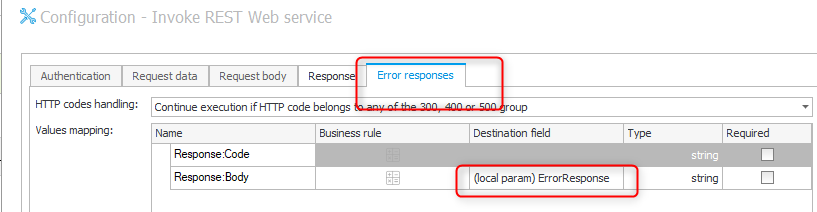
You have an option in the REST action to continue, even if it failed. In my case I had an item list which created multiple records in the ERP system and I implemented a status handling this way and also saved the error message. The status and error message are dedicated columns in the item list. I had to to do some post processing on the error response, but this isn't important for your question.

I also used the other option with the business rule and data source, but only for retrieving data. Passing data to an external system from a form which may trigger something in the external system feels wrong. Depending on the use case it would be impossible to generate the body with dynamic values. :)


Best regards,
Daniel

In reply to: Daniel Krüger (DCCS)

Hi macchina (Ernst?),

while I can understand the wish for not executing a save action / path transition it will be more robust and traceable in case of errors.

You have an option in the REST action to continue, even if it failed. In my case I had an item list which created multiple records in the ERP system and I implemented a status handling this way and also saved the error message. The status and error message are dedicated columns in the item list. I had to to do some post processing on the error response, but this isn't important for your question.

I also used the other option with the business rule and data source, but only for retrieving data. Passing data to an external system from a form which may trigger something in the external system feels wrong. Depending on the use case it would be impossible to generate the body with dynamic values. :)


Best regards,
Daniel

Hi Daniel!

In my case its a form with tons of fields. Some are calculated by the REST-Api (which calls an Oracle procedure). So the user has to fill out some fields, select some values and then the REST call should fill other fields (readonly for the user ui). There are 5 input-fields and the response contains 7 values (date, numeric, string) which are mapped to the form.
The form in this step is already saved => otherwise I could not use menu-actions.

Yes, it would be possible to make a transition, but thats more a workaround then a solution in my special use-case.

Webcon-Team - Wish for the future:
* make the error-msg in "Break with error" dynamic, so we could use a field-value
* add multivalues to business-rules

Best regards
Ernst

MVP
In reply to: macchina

Hi Daniel!

In my case its a form with tons of fields. Some are calculated by the REST-Api (which calls an Oracle procedure). So the user has to fill out some fields, select some values and then the REST call should fill other fields (readonly for the user ui). There are 5 input-fields and the response contains 7 values (date, numeric, string) which are mapped to the form.
The form in this step is already saved => otherwise I could not use menu-actions.

Yes, it would be possible to make a transition, but thats more a workaround then a solution in my special use-case.

Webcon-Team - Wish for the future:
* make the error-msg in "Break with error" dynamic, so we could use a field-value
* add multivalues to business-rules

Best regards
Ernst

Hi Ernst,

I don't have a good solution for this. I can imagine that the response format depends on the successfulness of the validation. If it really changes, the data source option won't help.
I haven't tested it but
Otherwise I also only see the option to use a business rule and do something unconventional, which would work if the response would be looking like either option
{
value : [ ..]
}
or
{
value :{}
}

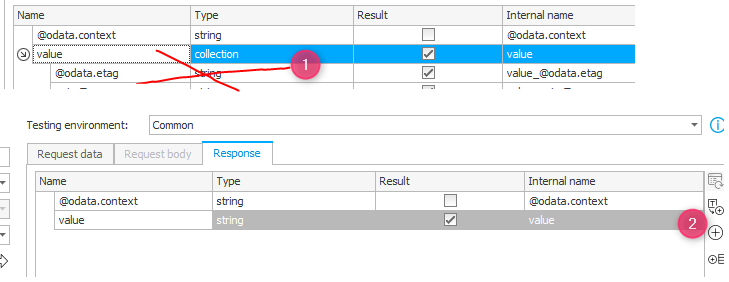
1. You could clone the data source
2. Remove the response fields and define the "value" property manually with type string.

Then you would get the whole response in one go and store the result in a technical field. On value change you could execute a JavaScript form rule to parse the content and set other fields as needed.

It could be worth a try. :)

Best regards,
Daniel