27.03.2026
 11:59
11:59
Hi,
I have an automation with a for each and selected "item list" as collection type with an item list (let's say A) of the form.
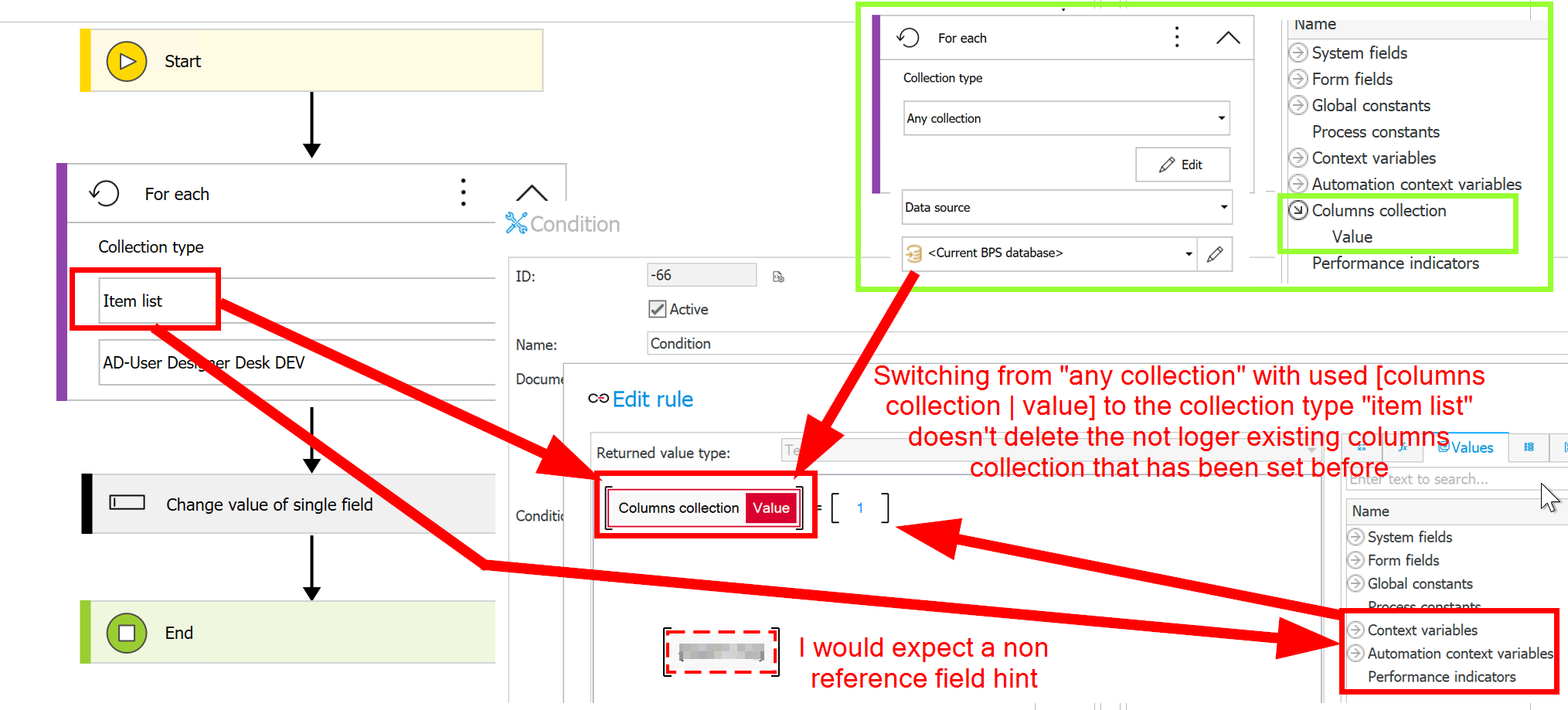
Now I expected to get all columns shown under "Columns collection" in the "Values" tab. But there is no entry for it. After searching a while I found the entry of this item list A under "Form fields" as the only item list.
Why don't you just keep the same logic as it is for the collection types "any collection" and "data source" where the "Colums collection" gets displayed? This would be more intuitive imho.
Moreover it seems to be "previewed" from a technical perspective. Follow these steps to reproduce the behavior:
1 Create for each with "any connection".
2 Add an action and use the entry "Value" under the entry "Columns collection"
3 Click OK and go back to the place where the for each is located
4 Switch the collection type to "item list" and select one
5 Go to the action where you've chosen the entry "Value" as before in point 2.
> The entry [Columns collection | value] is still there and referenceable as there is no dashed line indicating a broken reference. The value seems to always return EMPTY. No error is occuring.
I would suggest to show the item list's columns under "Columns collection" instead of "Form fields" and to display the broken reference as broken one with dashed border.
What do others think about it?
Kind regards
Sébastien