30.04.2026
 10:04
10:04
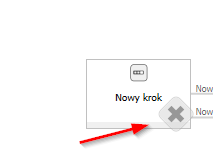
What does the X icon mean on an intermediate step in the workflow diagram?
30.04.2026
10:04
What does the X icon mean on an intermediate step in the workflow diagram?
30.04.2026
10:40
Hi,
if you mean the X from the screenshot, it appears if there is more than one output path from the step (the user has a choice)
 30.04.2026
10:48
30.04.2026
10:48
Hi,
if you mean the X from the screenshot, it appears if there is more than one output path from the step (the user has a choice)
Hi. Are you sure? https://kb.webcon.pl/kroki-systemowe-jak-dzialaja/
There we've got one path from the start step.
30.04.2026
11:15
Hi. Are you sure? https://kb.webcon.pl/kroki-systemowe-jak-dzialaja/
There we've got one path from the start step.
Hi Filip,
I'm not 100% sure but that's what it looked like in my tests ;)
30.04.2026
11:29
Hi Filip,
I'm not 100% sure but that's what it looked like in my tests ;)
Hi everyone,
It seems like this icon is only on the versions preceding the workflow GUI rehaul, we couldn't get it to display in 2025.2.1.*
In the old workflow designer paths which were 'hidden', were not showing up in the designer studio diagram view, you had to look for them in step configurations (this would explain Filips findings)