 07.07.2026
 13:56
13:56
Hi,
I'm updating a WEBCON BPS environment to version 2026.2.1.62. I no longer have the password for the solr administrative user, so following the recommended procedure I:
Made a backup of the BPS_Activities collection.
Completely uninstalled the WEBCON BPS Search Server component.
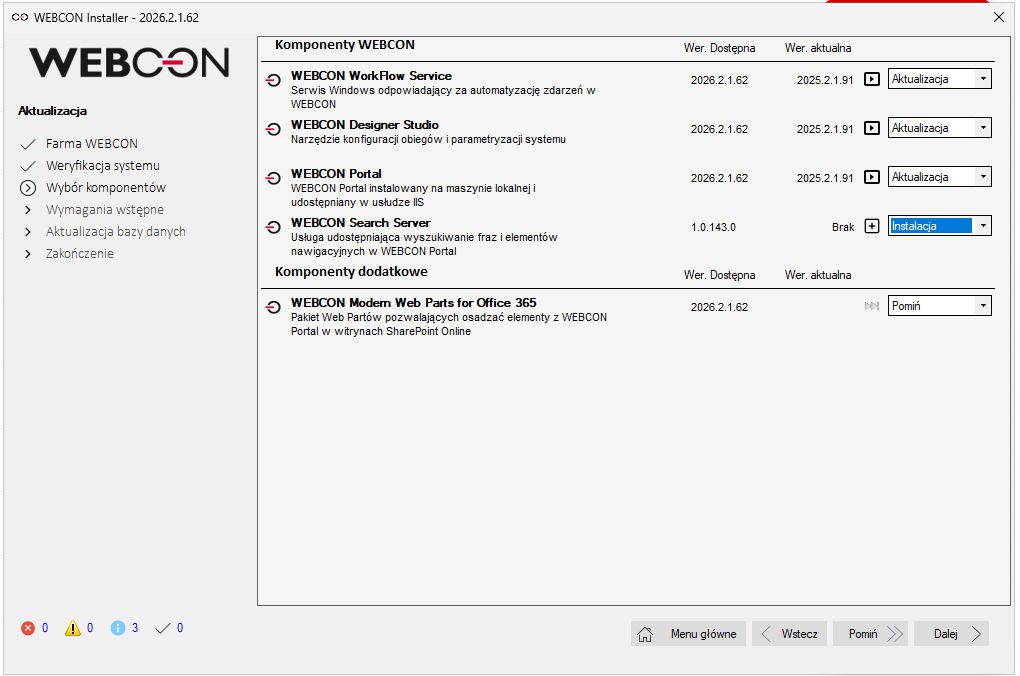
Started the update with the new installer, and in the "Choose components" step I set WEBCON BPS Search Server to "Install" (fresh installation), while the remaining components are set to "Update" — see screenshot "image1.png"
Despite this, when I reach the "Search Server database verification" step, the installer still asks me to provide the solr admin login and password ("required to migrate the Search Server database")
I've also confirmed that C:\Program Files\WEBCON\WEBCON BPS Search Server is empty after the uninstall, so no leftover files exist there.
My questions:
Could this be caused by a leftover Search Server registration in the BPS_Config database from the previous installation, even though the component itself and its files were removed?
Is there a supported way (via installer's System Management Tools, or otherwise) to clear/reset this old registration before retrying, without manually editing the configuration database?
Any guidance would be appreciated — happy to provide more details/logs if needed.
Thanks in advance!