Home > Forum > Plugins > API REST connection to DMS System "Enaio"

API REST connection to DMS System "Enaio"
0

Hello everyone,

We are currently developing an offer tracking solution in WEBCON. During the project, management requested that users should be able to directly access the offer (PDFs stored in our DMS) from within WEBCON.
(If you want to know how I handled the offer tracking see my thread https://community.webcon.com/forum/thread/8743?page=1#m8782)

Our DMS is ENAIO, which provides a REST API. My goal is to create an integration between WEBCON and ENAIO so that users can open and view the corresponding offer documents directly from the WEBCON application.

The documents should not be stored in WEBCON. We only want to provide a visual access point, allowing users to retrieve and display the PDFs on demand via the ENAIO REST API.

This would be the first REST API integration I build with WEBCON, so I would like to ask the community:

Has anyone already implemented an integration between WEBCON and ENAIO?
Do you have experience retrieving and displaying documents from an external DMS via REST API?
Are there any best practices, pitfalls, or example implementations you can share?

I would greatly appreciate any advice, experiences, or existing approaches that could help us get started.
I have already reviewed both the ENAIO interface documentation and the WEBCON REST API documentation. However, as someone building this type of integration for the first time, I find both sources quite technical and sometimes difficult to translate into a practical implementation approach.

What would help me most would be a step-by-step tutorial, a sample project, a video walkthrough, or any real-world example that demonstrates how to connect an external system to WEBCON via REST API and display documents retrieved from that system. If anyone knows of useful resources or has experience with a similar implementation, I would be very grateful for your recommendations.

Thank you in advance!

Best regards,
Matthias

MVP

Hello Matthias,
Your use case will propably need an SDK rather than just a INVOKE REST Web Service action.
Invoking REST API action is back-end task, it fetches data and saves it in database, or pushes data to external system, there is no possibility to create a custom 'widget' on form with this action.
There is a chance to create an Attachment in WEBCON with REST API, but this breaks your requirement, that documents won't be saved in WEBCON.

I'd check if from ENAIO there is a possibility to fetch some kind of identifier of the document, and maybe store that identifier in WEBCON attribute, which could be maybe used to construct some url, that would redirect user to ENAIO to specific document, or maybe use an iframe? - this might be easiest to implement with just INVOKE REST Web Service action.

If you don't want to store the data in Webcon, and the REST API from ENAIO provides only download endpoints, then the only solution would be to create some kind of SDK (https://developer.webcon.com/docs/bps-sdk/) for user form, which will handle fetching that file and displaying it without any save to database.

In reply to: Maksymilian Stachowiak

Hello Matthias,
Your use case will propably need an SDK rather than just a INVOKE REST Web Service action.
Invoking REST API action is back-end task, it fetches data and saves it in database, or pushes data to external system, there is no possibility to create a custom 'widget' on form with this action.
There is a chance to create an Attachment in WEBCON with REST API, but this breaks your requirement, that documents won't be saved in WEBCON.

I'd check if from ENAIO there is a possibility to fetch some kind of identifier of the document, and maybe store that identifier in WEBCON attribute, which could be maybe used to construct some url, that would redirect user to ENAIO to specific document, or maybe use an iframe? - this might be easiest to implement with just INVOKE REST Web Service action.

If you don't want to store the data in Webcon, and the REST API from ENAIO provides only download endpoints, then the only solution would be to create some kind of SDK (https://developer.webcon.com/docs/bps-sdk/) for user form, which will handle fetching that file and displaying it without any save to database.

Hi Maksymilian,

thank you for your reply.
I thought about REST API because our new ERP system will use exactly that to generate the offer PDF and then store it IN Enaio. The wish of the users who work with the ERP was to have them displayed in the ERP via a deep link from Enaio without always having to call up the other program Enaio.
Naively, so I thought that it would also have to be possible to display these via REST in WEBCON.

Theoretically, it is also conceivable to save the PDF in WEBCON for the offer. The field staff currently receive a copy of every offer via email. Since we already have a version in the DMS AND on the Microsoft Outlook Server,
I didn't want an additional copy in WEBCON. If there is no other way and a copy is created in WEBCON, I would have the info mail adapted in the future and remove the copy there and forward it to WEBCON via a link.

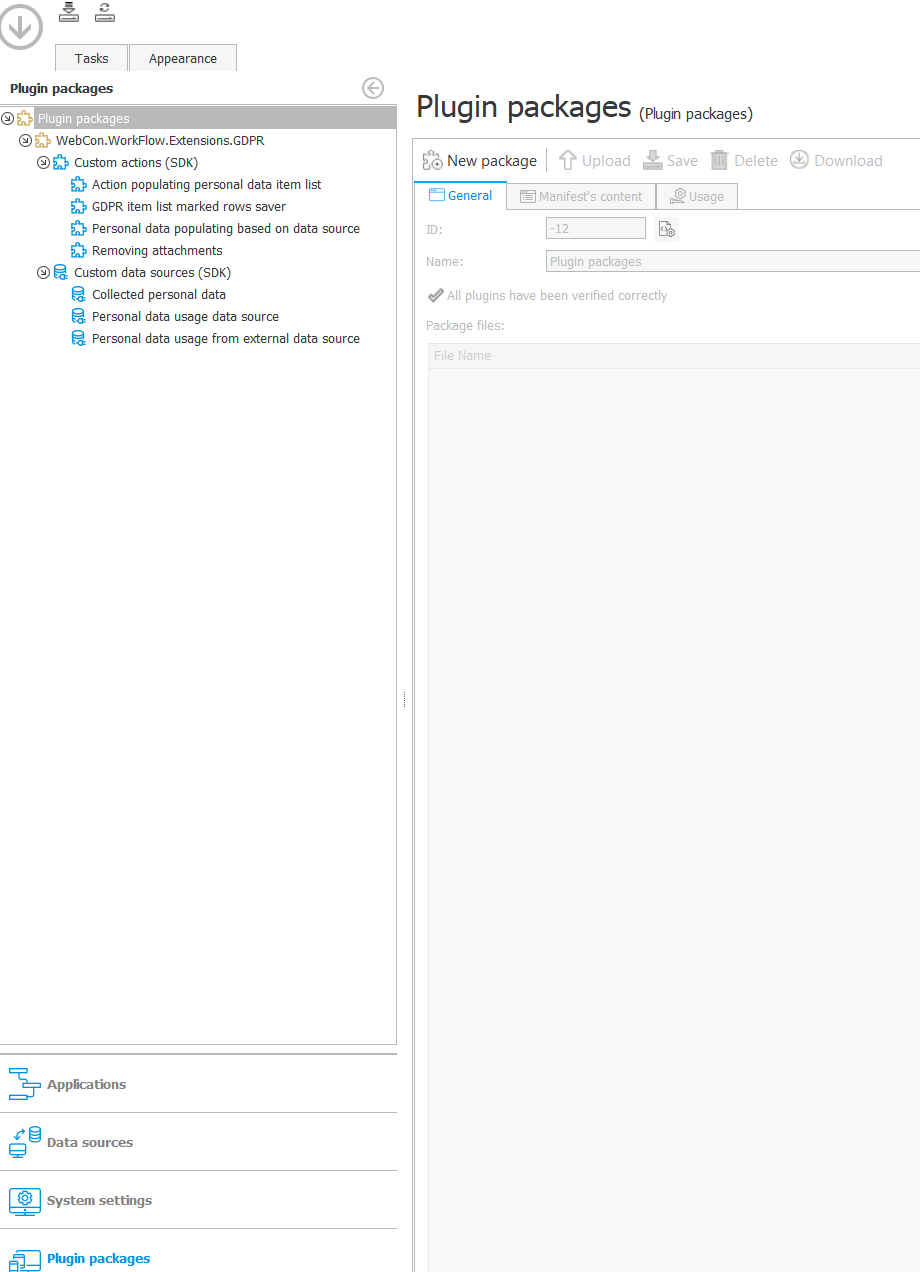
Unfortunately, I don't have any experience with the SDK yet as well. Where do I even see if we have that? When I click on "Plugin packages" it says something there, but I have no idea whether that means I can use it. (See picture)

MVP

Hi,

maybe, I've missed something but why do we need an SDK or the REST API action?

Assuming that the WEBCON supports the available authentication methods I would:
- Create a REST connection with the authentication
- Add a data source with the API endpoint to fetch the documents and there links, assuming that there's such an endpoint
- Use a data table to render the filtered data source

It would be best, if the endpoint supports some kind of filtering. In this case you could add the "offer number" field as a query parameter value in the data source definition.

If the endpoint does not return the deep links to open the documents directly, you could create a User Defined API Endpoint which returns the information.
https://daniels-notes.de/posts/2026/user-defined-api-part-2-get-data-from-data-sources

Afterwards you would:
- Export the API documentation
- Kindly ask AI to build a little JavaScript which executes the WEBCON endpoint and build a nice looking HTML table with the actual links from the returned data. The links should be opened in a new tab or be displayed in a "modal dialog".

These are just two ideas, but they depend on the actual form layout, ho the users should open the documents and the endpoints.


Best regards,
Daniel

In reply to: Daniel Krüger (DCCS)

Hi,

maybe, I've missed something but why do we need an SDK or the REST API action?

Assuming that the WEBCON supports the available authentication methods I would:
- Create a REST connection with the authentication
- Add a data source with the API endpoint to fetch the documents and there links, assuming that there's such an endpoint
- Use a data table to render the filtered data source

It would be best, if the endpoint supports some kind of filtering. In this case you could add the "offer number" field as a query parameter value in the data source definition.

If the endpoint does not return the deep links to open the documents directly, you could create a User Defined API Endpoint which returns the information.
https://daniels-notes.de/posts/2026/user-defined-api-part-2-get-data-from-data-sources

Afterwards you would:
- Export the API documentation
- Kindly ask AI to build a little JavaScript which executes the WEBCON endpoint and build a nice looking HTML table with the actual links from the returned data. The links should be opened in a new tab or be displayed in a "modal dialog".

These are just two ideas, but they depend on the actual form layout, ho the users should open the documents and the endpoints.


Best regards,
Daniel

I have implemented something similar before. Our DMS API returns a list of documents—including a direct link to the file—based on a key consisting of the customer number and document type.

This allowed me to build a REST data source using the customer number from the form and the document type from a global constant. The results are displayed as a data table within the form.

The only issue is that this data source can only be used for this single purpose, as it is bound to the customer number field of that specific process or workflow. Unfortunately, it is not possible to pass parameters. Filtering the data later (by customer number) is not practical, as the data source—if configured as a query without a customer number—would contain around 200,000 entries.

Best reards,
Ernst

Hello everyone,
I have now found a solution that, at least for the time being, works so far as I use in in the WEBCON fronteend portal.
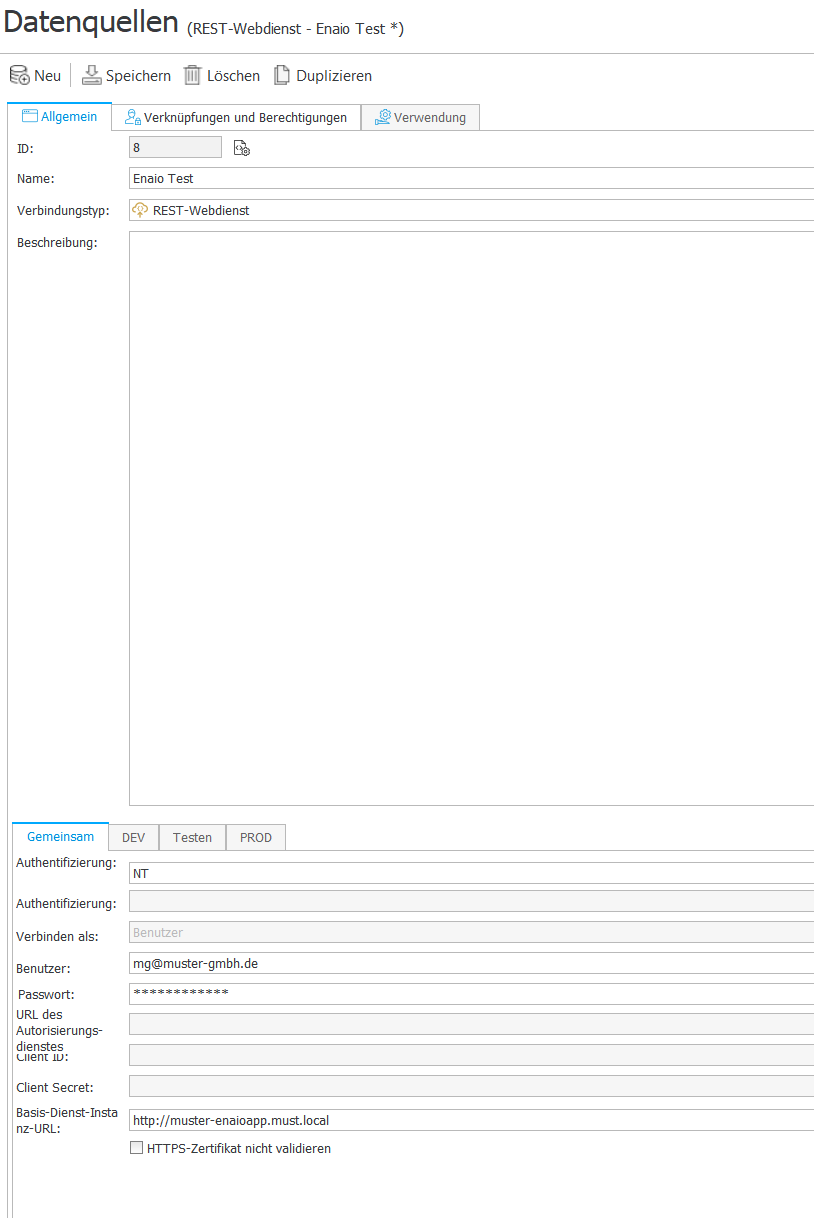
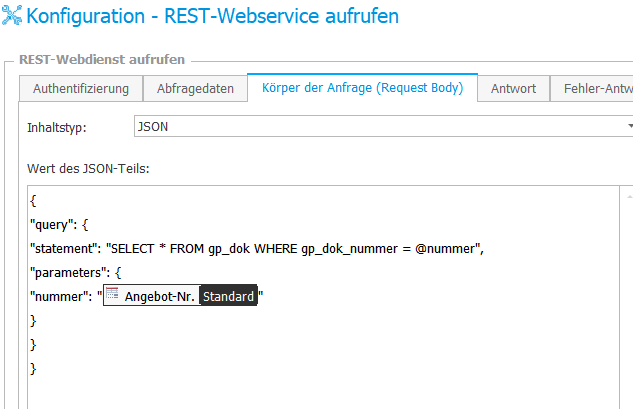
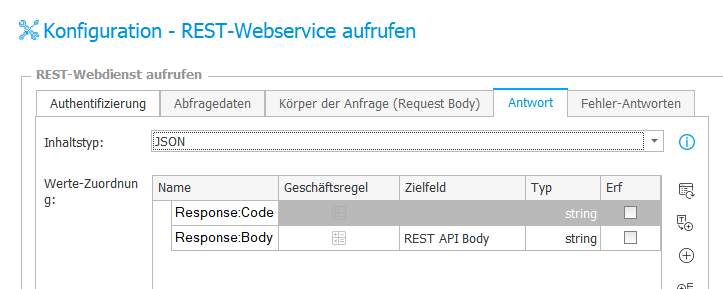
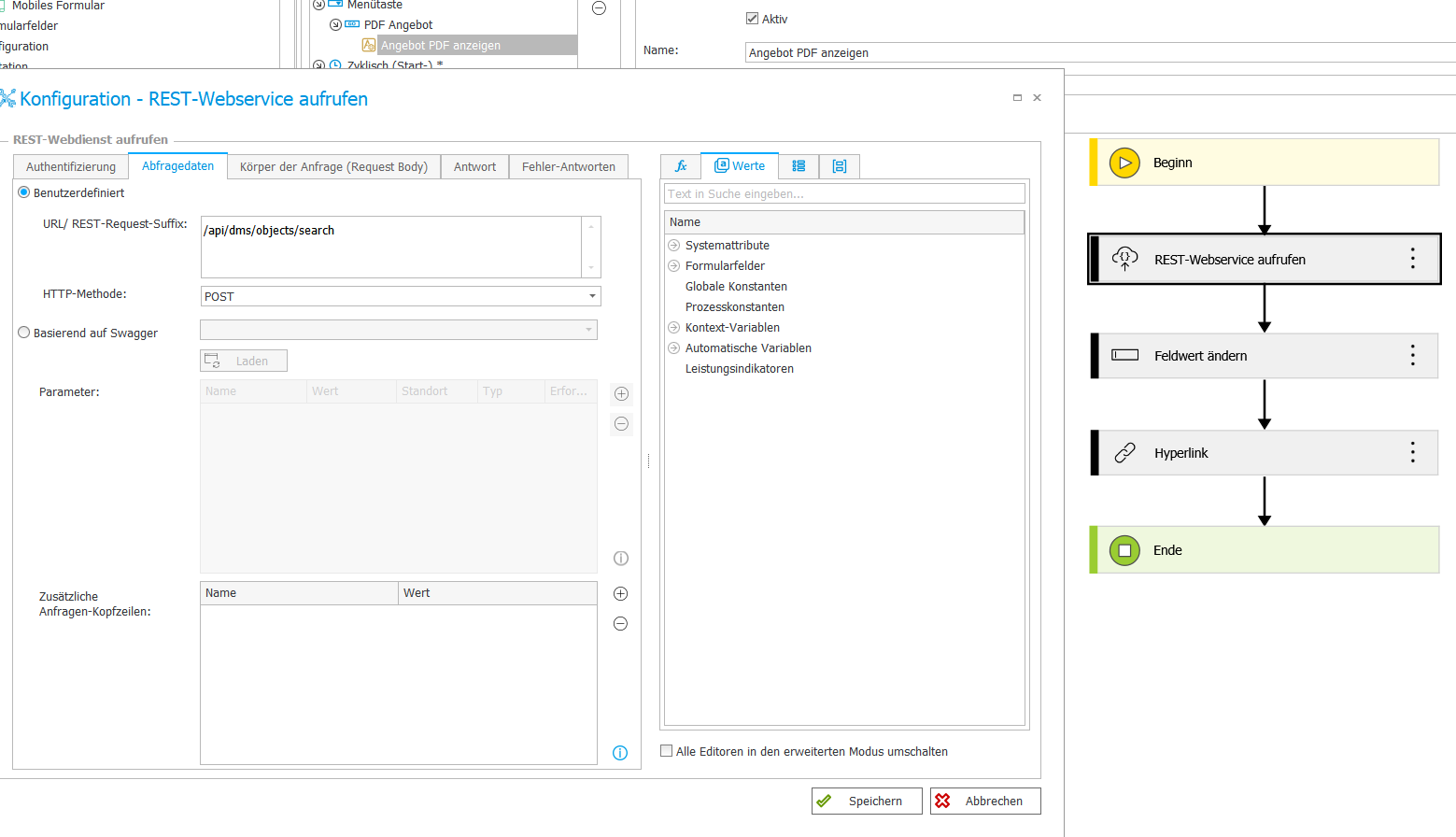
As shown in the attached screenshot, I created a REST Web Service data source. Using a Menu Button, I trigger the REST Web Service action to access the DMS data source and retrieve the complete response body containing the relevant document information. According to the WEBCON documentation, Menu Buttons can be used to execute automations and actions such as REST Web Service calls.
In a subsequent action, I extract the part of the response body that contains the Object ID of the PDF document. This Object ID is then written into a hidden technical field using a Change field value action.
In the next step, I call the PDF using the corresponding REST API method. The placeholder for the Object ID in the URL is dynamically replaced with the value stored in the technical field.
As a result, users can open their offers from the report view, enter the workflow instance, and, while in edit mode, click the"Download PDF" menu button to retrieve the document from the DMS. For now, I am quite satisfied with this solution because it basically works as intended. I also thaught of attaching the PDF in general to every offer that ist imported at night. But for some reason I can not choose "binary" as type when usin the REST-action in a cyclic triggerd event.

However, I am currently facing one issues:
1. User authorization problem
Other users are unable to download the documents.
In the REST connection configuration, I stored my personal username and password. Therefore, I assumed that regardless of which user clicks the button, the request would be executed in the background using my credentials. Apparently, WEBCON still recognizes the currently logged-in user and denies access to anyone except me.
I guess I have to contact Enaio Support, if there is any possibility to make the request working independent from the frontend user.


Best regards,
Matthias