
[External] Alternative take on Fixed values list
autor: Maksymilian Stachowiak
Problem
Inside Designer Studio we have the possibility to define a Fixed Values List - which is pretty neat tool, for creating really tiny lists.
In most use cases where i used them I've ended up with creating a Fixed Values List let's say Invoice Types, and then creating the same Process Constants, to avoid leaving Magic Numbers inside of the configuration.
Just as simple thing as setting the default value is easier to read when we're using 'Invoice - Standard' rather than let's say 1.
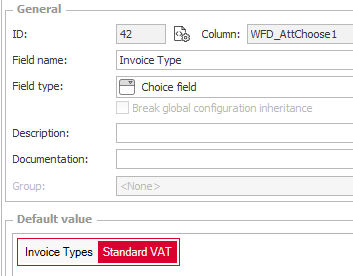
This forces rendundant work, end welcomes inconsistency - first create a list, then add values as constants, and make sure to keep those in sync.
There is better solution for such challenge if you've written some code you might have met Enums already, and we can recreate something like Enums in Designer Studio.
Solution
Solution is rather simple - instead of creating a Fixed Values List, we will create a group of constants like this one:
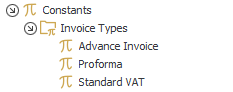
On top of that, we'll add new SQL data source with query getting all constants inside of our Group (we need to get the GUID of the group too, and i'll come back to this in a second).
SELECT
 epv_default AS id,
 epv_guid AS guid,
 epv_name AS description,
 EPV_UseDev,
 EPV_Dev,
 EPV_UseTest,
 EPV_Test,
 EPV_UseProd,
 EPV_Prod
FROM WFEnvironmentProcessVariables
LEFT OUTER JOIN WFEnvironmentProcessVariablesGroups ON EPV_GroupID = EPVG_ID
WHERE
epvg_guid = '204e582d-d65b-4f0d-97f9-07b63ff2e485'
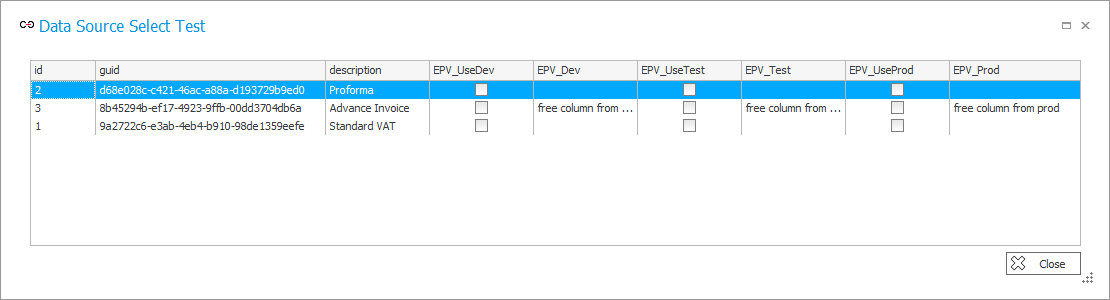
Above SQL produces output like below which we already can use as our data source for dropdown, and it's by default synced with the constants, as the constants we create define whats in the data source!
I've left you with 2 topics without an answer, so back to them:
How do we handle the Constant for GUID of the group?
1. It's not directly visible in Designer Studio unfortunatelly, but we can grab it with an SQL:
SELECT EPVG_GUID FROM
WFEnvironmentProcessVariablesGroups WHERE EPVG_ID = {here your id}
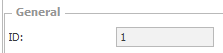
Based on which i personally create a global constant, but filtering could be done in a few other ways too.
2. The per environment values of constants
EPV_UseDev,
EPV_Dev,
EPV_UseTest,
EPV_Test,
EPV_UseProd,
EPV_Prod
Overrides of the value on different environments works only, when you mark the 'Break inheritance checkbox'. That's the moment when we can type in the value, after we typed it in there, and we untick the box, the value stays there, but it's not being used by the platform itself. So, we could treat it as 3 columns - it's free real estate 😉.
Summary
With proposed solution - we're always syncing our dropdowns with list of constant values, and we can easily reference values from our list in cleaner way rather than leaving magic numbers around the config.
As a bonus (if you were living with magic numbers before) now you can see where each constant is being used, instead of trying to remember where did you let's say compared something with values from the data source, but as magic hard-coded 1.
As a 2nd bonus, you could increase the count of columns available for `Fixed Values List` from 3, to 6, or even 7, if you would use just the GUID as an identifier (i've used EPV_Default as ID, but you don't have to).
Limitations
This solution requires SELECT permissions for WFEnvironmentProcessVariables and WFEnvironmentProcessVariablesGroups tables, which is not a default state in all installations.
You can read more about it in this article by WEBCON, which explains when the permissions should be there, and what to do if it's not the case.

+48 12 443 13 90