Home > Forum > Plugins > Questions about printouts, scheduling, plugin packages, custom objects and file export in WEBCON BPS

Questions about printouts, scheduling, plugin packages, custom objects and file export in WEBCON BPS
0

Hi all,

I have several questions regarding WEBCON BPS capabilities and best practices:

Is it possible to create printouts (printable documents / reports) that use values from form fields (e.g., Date from, Date to, Choice fields, Text fields) and generate a printable confirmation for the user?

Does WEBCON BPS have a built-in task scheduler / job scheduler (harmonogram zadań)?

What are plugin packages mainly used for, considering that many business rules and logic can already be configured using the standard rule editor (click-based configuration)?

Is it possible to create custom configurations with custom objects/entities that are not standard WEBCON system objects?

Can individual files or attachments from specific workflow instances be exported or downloaded automatically (for example via action, rule, or API)?

Thank you in advance for your help people.

Best regards,

MVP

Hi Androsh,

I will briefly answer the questions.

# Is it possible to create printouts (printable documents / reports) that use values from form fields (e.g., Date from, Date to, Choice fields, Text fields) and generate a printable confirmation for the user?
Yes, you can generate Word documents /HTML documents with those information and generate a PDF file from them.

# Does WEBCON BPS have a built-in task scheduler / job scheduler (harmonogram zadań)?
# Is it possible to create custom configurations with custom objects/entities that are not standard WEBCON system objects?
Keep in mind that WEBCON is based on workflow instances with fields. Everything is a workflow instance, with one or more steps. These can be used for various information.
I often create some kind of "technical" workflow which is similar to a task and is triggered by Cyclical actions.
https://docs.webcon.com/docs/2026R1/Studio/Workflow/Workflow_GlobalAction3/CyclicalActions

# What are plugin packages mainly used for, considering that many business rules and logic can already be configured using the standard rule editor (click-based configuration)?
In my WEBCON career I use probably 1% of the time for some kind of plugin /JavaScript creation. I could achieve most of the functionality with the standard features. If those are lacking, the plugins save the day. :)


# Can individual files or attachments from specific workflow instances be exported or downloaded automatically (for example via action, rule, or API)?
When the workflow reaches a step/triggers a path you could push those attachments somewhere. You can also download them via the REST API.

In the end , all of these are generic answers to generic questions. :)

Best regards,
Daniel

In reply to: Daniel Krüger (DCCS)

Hi Androsh,

I will briefly answer the questions.

# Is it possible to create printouts (printable documents / reports) that use values from form fields (e.g., Date from, Date to, Choice fields, Text fields) and generate a printable confirmation for the user?
Yes, you can generate Word documents /HTML documents with those information and generate a PDF file from them.

# Does WEBCON BPS have a built-in task scheduler / job scheduler (harmonogram zadań)?
# Is it possible to create custom configurations with custom objects/entities that are not standard WEBCON system objects?
Keep in mind that WEBCON is based on workflow instances with fields. Everything is a workflow instance, with one or more steps. These can be used for various information.
I often create some kind of "technical" workflow which is similar to a task and is triggered by Cyclical actions.
https://docs.webcon.com/docs/2026R1/Studio/Workflow/Workflow_GlobalAction3/CyclicalActions

# What are plugin packages mainly used for, considering that many business rules and logic can already be configured using the standard rule editor (click-based configuration)?
In my WEBCON career I use probably 1% of the time for some kind of plugin /JavaScript creation. I could achieve most of the functionality with the standard features. If those are lacking, the plugins save the day. :)


# Can individual files or attachments from specific workflow instances be exported or downloaded automatically (for example via action, rule, or API)?
When the workflow reaches a step/triggers a path you could push those attachments somewhere. You can also download them via the REST API.

In the end , all of these are generic answers to generic questions. :)

Best regards,
Daniel

Hi Daniel,

Thank you for the detailed and clear answers — this is very helpful.
It gives me a much better understanding of WEBCON’s capabilities and possible approaches.

I appreciate your time and explanations.

Best regards,
Androsh

In reply to: Daniel Krüger (DCCS)

Hi Androsh,

I will briefly answer the questions.

# Is it possible to create printouts (printable documents / reports) that use values from form fields (e.g., Date from, Date to, Choice fields, Text fields) and generate a printable confirmation for the user?
Yes, you can generate Word documents /HTML documents with those information and generate a PDF file from them.

# Does WEBCON BPS have a built-in task scheduler / job scheduler (harmonogram zadań)?
# Is it possible to create custom configurations with custom objects/entities that are not standard WEBCON system objects?
Keep in mind that WEBCON is based on workflow instances with fields. Everything is a workflow instance, with one or more steps. These can be used for various information.
I often create some kind of "technical" workflow which is similar to a task and is triggered by Cyclical actions.
https://docs.webcon.com/docs/2026R1/Studio/Workflow/Workflow_GlobalAction3/CyclicalActions

# What are plugin packages mainly used for, considering that many business rules and logic can already be configured using the standard rule editor (click-based configuration)?
In my WEBCON career I use probably 1% of the time for some kind of plugin /JavaScript creation. I could achieve most of the functionality with the standard features. If those are lacking, the plugins save the day. :)


# Can individual files or attachments from specific workflow instances be exported or downloaded automatically (for example via action, rule, or API)?
When the workflow reaches a step/triggers a path you could push those attachments somewhere. You can also download them via the REST API.

In the end , all of these are generic answers to generic questions. :)

Best regards,
Daniel

Hi Daniel,
I would like to clarify one point regarding custom objects/entities. -> "# Is it possible to create custom configurations with custom objects/entities that are not standard WEBCON system objects?."

What I actually meant was the UI layer:
Is it possible in WEBCON to create custom UI components or custom form controls (beyond standard form fields), e.g. custom widgets or reusable UI elements?

Best regards,
Androsh

MVP
In reply to: Androsh

Hi Daniel,
I would like to clarify one point regarding custom objects/entities. -> "# Is it possible to create custom configurations with custom objects/entities that are not standard WEBCON system objects?."

What I actually meant was the UI layer:
Is it possible in WEBCON to create custom UI components or custom form controls (beyond standard form fields), e.g. custom widgets or reusable UI elements?

Best regards,
Androsh

Hi Androsh,

there are two options:

1. Form field extensions
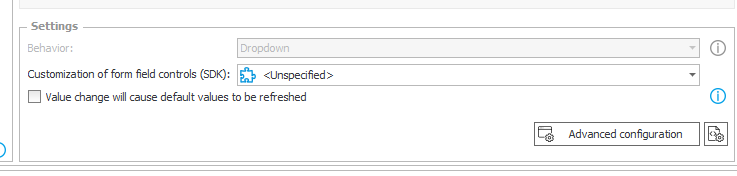
This will allow you to provide a custom UI representation and logic for a form field. This uses a form field as a "backend" and you can create the UI using React and add server side logic. There are some field types which can not be used for it. You can check it in the area of the advanced configuration button.

In this example I created a password field:
https://daniels-notes.de/posts/2023/password-field
Official documentation:
https://developer.webcon.com/docs/your-first-form-field-extension-js

2. JavaScript
You can use JavaScript to interact with WEBCON there are quite a lot of functions available. This is the solution I use most often. It's faster than developing the component, uploading it to the Designer, etc. :)
Here you can get an idea what can be done:
https://daniels-notes.de/tags/#javascript
Another "crazy" one which I did for a customer ist using a custom Gantt library which uses an item list as a "backend"
https://www.youtube.com/watch?v=x5IuCKivDV4


Best regards,
Daniel

In reply to: Daniel Krüger (DCCS)

Hi Androsh,

there are two options:

1. Form field extensions
This will allow you to provide a custom UI representation and logic for a form field. This uses a form field as a "backend" and you can create the UI using React and add server side logic. There are some field types which can not be used for it. You can check it in the area of the advanced configuration button.

In this example I created a password field:
https://daniels-notes.de/posts/2023/password-field
Official documentation:
https://developer.webcon.com/docs/your-first-form-field-extension-js

2. JavaScript
You can use JavaScript to interact with WEBCON there are quite a lot of functions available. This is the solution I use most often. It's faster than developing the component, uploading it to the Designer, etc. :)
Here you can get an idea what can be done:
https://daniels-notes.de/tags/#javascript
Another "crazy" one which I did for a customer ist using a custom Gantt library which uses an item list as a "backend"
https://www.youtube.com/watch?v=x5IuCKivDV4


Best regards,
Daniel

Hi Daniel,

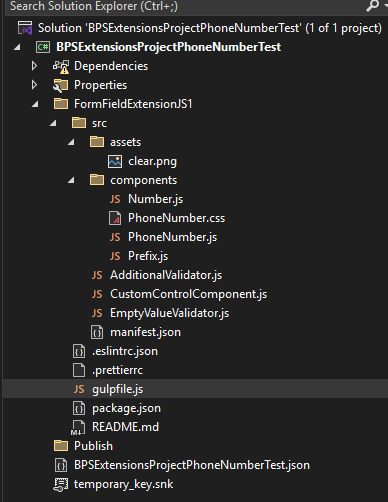
I was following the instructions for Form field extensions:
https://developer.webcon.com/docs/your-first-form-field-extension-js

I got stuck at the first build step in WEBCON BPS SDK Tools, specifically here:

"In order to build your Form Field Extension JS you have to select it in the appropriate dropdown in the tool and click the build button. It results in creating the BPSPKG file which contains all necessary files for the control. Please keep in mind that the first time you build the modern form field will take a little bit longer, due to downloading all the npm dependencies the extension needs."

In my case, the build process does not complete successfully and the BPSPKG file is not generated. By the way my dropdown in WEBCON BPS SDK Tools Chat I dont have anything(image 1 )

Could you please advise what prerequisites or configuration should be checked (Node.js version, npm, paths, permissions, etc.) or what could cause this issue?

Best regards,

Androsh